> ## Documentation Index
> Fetch the complete documentation index at: https://docs.benefitflow.com/llms.txt
> Use this file to discover all available pages before exploring further.
# Broker Office Insights
> Market share, client mix, growth trends, key partners, and contacts for any broker office
Broker Office Insights gives you a detailed analytical view of any broker office in BenefitFlow — market position, book composition, growth trajectory, carrier relationships, and key contacts. All data is derived from Form 5500 filings and BenefitFlow's proprietary broker-client mapping.
## Getting there
1. Search for a broker from the **Broker** tab
2. On the broker's profile, find the office you want under the **Offices** tab
3. Click **View Insights** on any office row
You'll land on the **Office Insights** tab with five sections in the left sidebar.
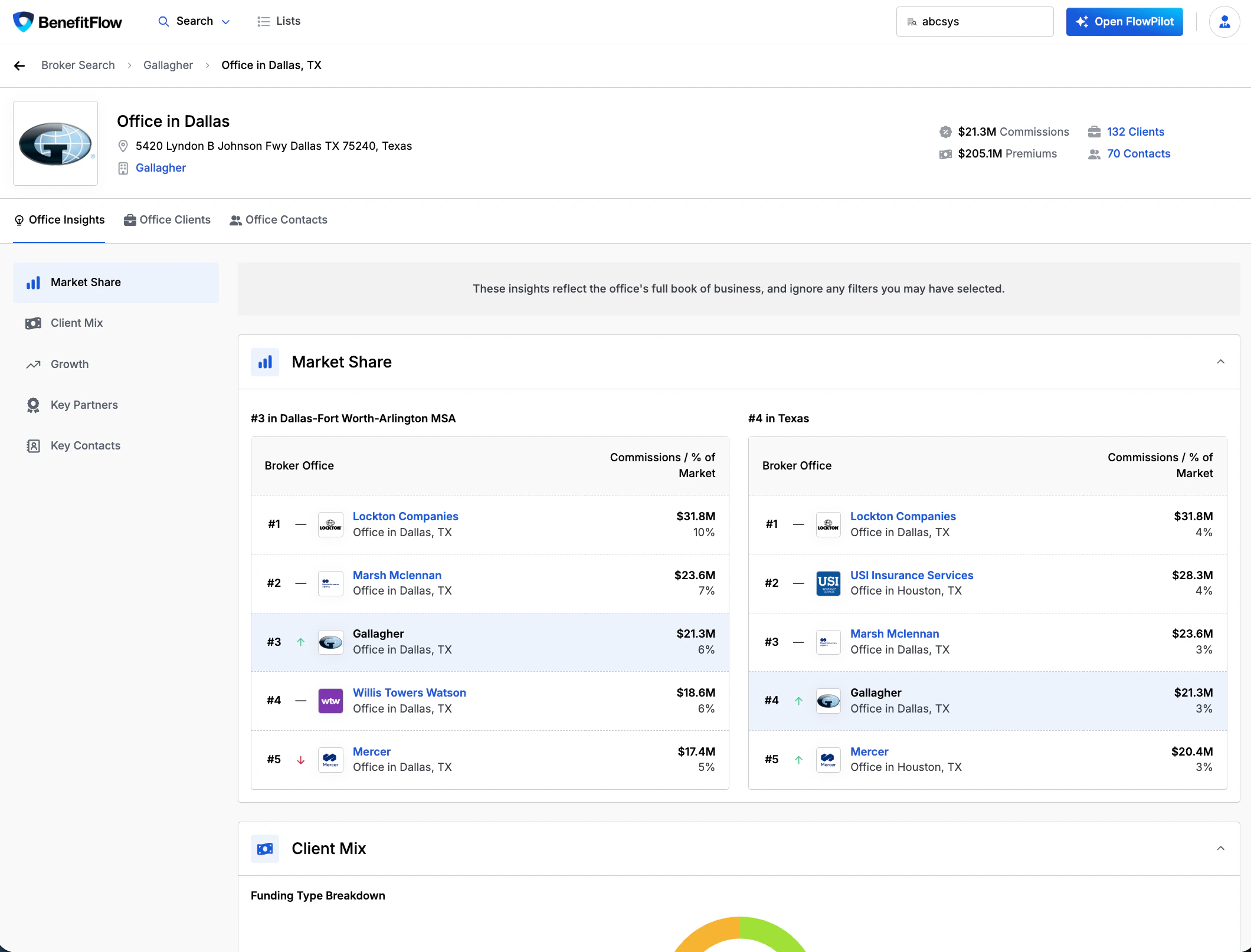 ## Market Share
See how this office ranks against competitors in its geography.
* **MSA ranking** — position and market share by commissions in the office's metro area
* **State ranking** — same view at the state level
* Each leaderboard shows the top broker offices with commissions and % of market
* The current office is highlighted so you can quickly see where they stand
**Use case:** Identify whether a broker office dominates its local market or has room to grow — useful for competitive positioning and prospecting conversations.
## Client Mix
Understand the composition of the office's book of business.
* **Funding Type Breakdown** — donut chart showing the split between self-funded and fully insured clients
* **Employee Size Distribution** — bar chart showing client count by employer size band (0–100, 101–200, 201–500, 501–1,000, 1,000+), color-coded by funding type
* **Top Industries** — bar chart showing the office's top 5 industries by client count
**Use case:** Quickly assess whether a broker office is focused on small groups vs. large employers, self-funded vs. fully insured, and which industries they concentrate in.
## Growth
Track how the office's book has changed over time.
* **Client Count Trend** — 5-year bar chart showing total client count per year
* **Net New Clients** — line chart showing net client adds over the past 12 months
* **Client Retention Rate** — 3-year average retention percentage
* The Clients list can be filtered by **Primary Broker**, **Broker Tenure**, and **Broker Commissions**
* **Clients Won / Lost / Stopped Filing** — stacked bar chart breaking down annual client movement:
* **Clients Won** (green) — new employer relationships added that year
* **Lost Clients** (red) — employers that moved to a different confirmed broker
* **Stopped Filing** (orange) — employers that stopped filing Form 5500 entirely (no confirmed new broker)
**Stopped Filing ≠ Lost.** "Stopped Filing" means the employer no longer appears in Form 5500 data — they may have dropped coverage, gone below the filing threshold, or switched to a broker we can't yet identify. These are separated from confirmed losses to avoid unfairly skewing retention metrics.
**Use case:** Assess whether a broker office is growing or shrinking, how fast, and whether they're losing clients to competitors or to filing gaps.
## Key Partners
See the carriers and vendors this office works with most.
* **Top Medical Carriers** — table showing carrier name, top product, covered lives, client count, and premiums with % of total
* **Top Ancillary Carriers** — same format for dental, vision, life, disability, and other lines
* **Top Vendors** — vendor name, category, and client count
**Use case:** Understand a broker office's carrier relationships before a meeting — which carriers dominate their book, where there might be gaps, and which vendors they use.
## Key Contacts
Browse the producers and account managers at this office.
* Contact cards showing name, title, location, and tenure
* **Verified Producer** badges for contacts with confirmed licensing
* **Unlock Contact** to reveal email and phone using contact credits
For the full contact list with advanced filters (role, job title, license type, carrier appointments), switch to the **Office Contacts** tab, where a search bar also lets you jump straight to a person.
***
## Related
Detailed employer views — benefits, history, deep research
How Form 5500 data powers BenefitFlow
How BenefitFlow determines the primary broker relationship
Create targeted outreach lists from search results
## Market Share
See how this office ranks against competitors in its geography.
* **MSA ranking** — position and market share by commissions in the office's metro area
* **State ranking** — same view at the state level
* Each leaderboard shows the top broker offices with commissions and % of market
* The current office is highlighted so you can quickly see where they stand
**Use case:** Identify whether a broker office dominates its local market or has room to grow — useful for competitive positioning and prospecting conversations.
## Client Mix
Understand the composition of the office's book of business.
* **Funding Type Breakdown** — donut chart showing the split between self-funded and fully insured clients
* **Employee Size Distribution** — bar chart showing client count by employer size band (0–100, 101–200, 201–500, 501–1,000, 1,000+), color-coded by funding type
* **Top Industries** — bar chart showing the office's top 5 industries by client count
**Use case:** Quickly assess whether a broker office is focused on small groups vs. large employers, self-funded vs. fully insured, and which industries they concentrate in.
## Growth
Track how the office's book has changed over time.
* **Client Count Trend** — 5-year bar chart showing total client count per year
* **Net New Clients** — line chart showing net client adds over the past 12 months
* **Client Retention Rate** — 3-year average retention percentage
* The Clients list can be filtered by **Primary Broker**, **Broker Tenure**, and **Broker Commissions**
* **Clients Won / Lost / Stopped Filing** — stacked bar chart breaking down annual client movement:
* **Clients Won** (green) — new employer relationships added that year
* **Lost Clients** (red) — employers that moved to a different confirmed broker
* **Stopped Filing** (orange) — employers that stopped filing Form 5500 entirely (no confirmed new broker)
**Stopped Filing ≠ Lost.** "Stopped Filing" means the employer no longer appears in Form 5500 data — they may have dropped coverage, gone below the filing threshold, or switched to a broker we can't yet identify. These are separated from confirmed losses to avoid unfairly skewing retention metrics.
**Use case:** Assess whether a broker office is growing or shrinking, how fast, and whether they're losing clients to competitors or to filing gaps.
## Key Partners
See the carriers and vendors this office works with most.
* **Top Medical Carriers** — table showing carrier name, top product, covered lives, client count, and premiums with % of total
* **Top Ancillary Carriers** — same format for dental, vision, life, disability, and other lines
* **Top Vendors** — vendor name, category, and client count
**Use case:** Understand a broker office's carrier relationships before a meeting — which carriers dominate their book, where there might be gaps, and which vendors they use.
## Key Contacts
Browse the producers and account managers at this office.
* Contact cards showing name, title, location, and tenure
* **Verified Producer** badges for contacts with confirmed licensing
* **Unlock Contact** to reveal email and phone using contact credits
For the full contact list with advanced filters (role, job title, license type, carrier appointments), switch to the **Office Contacts** tab, where a search bar also lets you jump straight to a person.
***
## Related
Detailed employer views — benefits, history, deep research
How Form 5500 data powers BenefitFlow
How BenefitFlow determines the primary broker relationship
Create targeted outreach lists from search results