> ## Documentation Index
> Fetch the complete documentation index at: https://docs.benefitflow.com/llms.txt
> Use this file to discover all available pages before exploring further.
# CRM Integrations: Overview Guide
## FAQs and general info
BenefitFlow currently supports native integrations with Salesforce, HubSpot, and Microsoft Dynamics.
 BenefitFlow’s Salesforce integration allows users to push Employers, Employer Contacts, Brokers, Broker Office Locations, and Broker Contacts... **and automatically manage the associations between them.**
 Before syncing over any data to your CRM, BenefitFlow will compare our records against the records in your CRM.
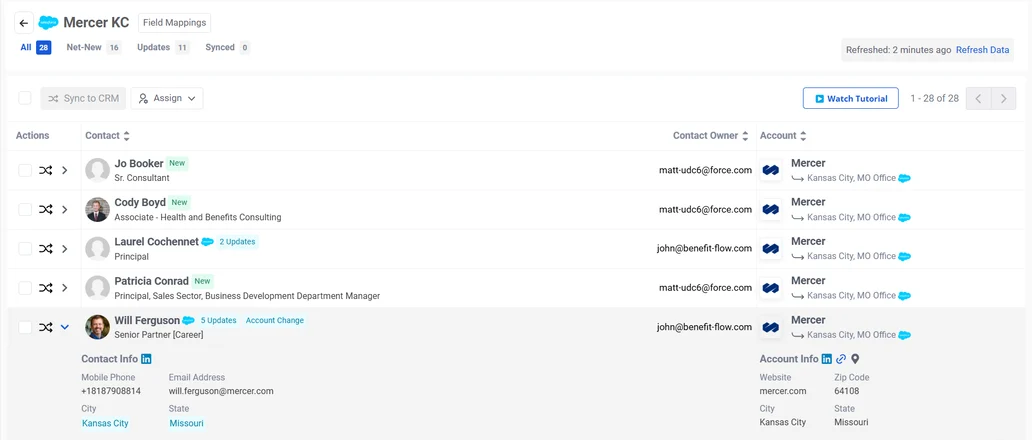 **Net-New** = Record will be pushed as a Net New Record.
**Updates** **Available** = Record already exists in your CRM. Sync will overwrite the highlighted fields.
**Synced** = Record already exists in your CRM and no updates are available.
| **Object** | **Unique Identifier** | **Example** |
| :---------------------- | :--------------------- | :------------------------------------------------------ |
| Employers | Website | walmart.com |
| Employer Contacts | Email | [john.smith@walmart.com](mailto:john.smith@walmart.com) |
| Brokers | Website | mercer.com |
| Broker Office Locations | Website + City + State | mercer.com + New York + NY |
| Broker Contacts | Email Address | [john.smith@mercer.com](mailto:john.smith@mercer.com) |
BenefitFlow maintains current and historical email addresses, meaning we can establish a match with your pre-existing contacts that may have stale email address.
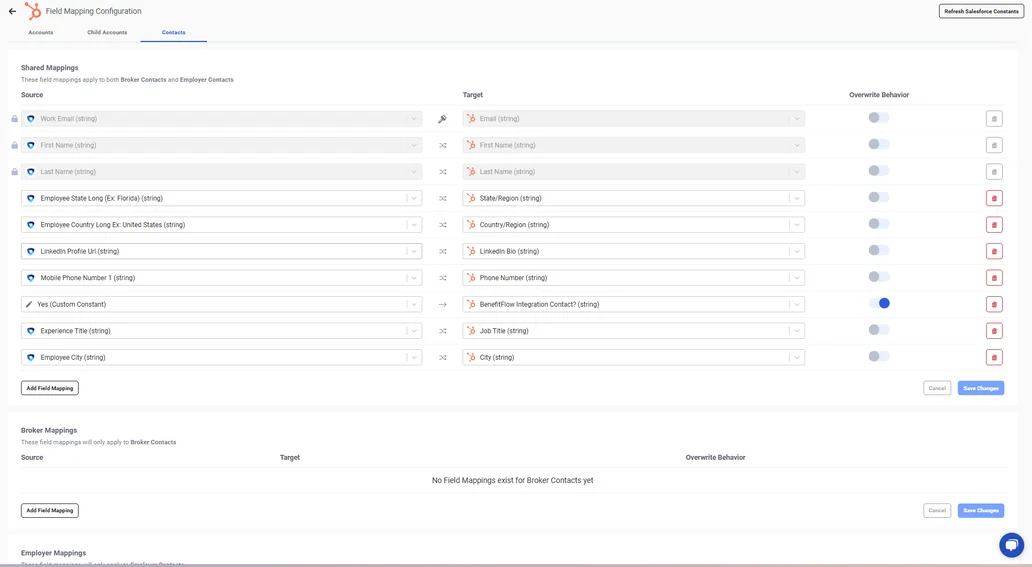
Admin users can configure the mapping table in BenefitFlow to your desired specifications.
For the full, searchable list of every BenefitFlow field you can map, by object type, see the [Field Mapping Reference](/knowledge-base/crm-field-mapping-reference).
### Mapping Table for Accounts
*(for syncing Broker and Employer records)*
**Net-New** = Record will be pushed as a Net New Record.
**Updates** **Available** = Record already exists in your CRM. Sync will overwrite the highlighted fields.
**Synced** = Record already exists in your CRM and no updates are available.
| **Object** | **Unique Identifier** | **Example** |
| :---------------------- | :--------------------- | :------------------------------------------------------ |
| Employers | Website | walmart.com |
| Employer Contacts | Email | [john.smith@walmart.com](mailto:john.smith@walmart.com) |
| Brokers | Website | mercer.com |
| Broker Office Locations | Website + City + State | mercer.com + New York + NY |
| Broker Contacts | Email Address | [john.smith@mercer.com](mailto:john.smith@mercer.com) |
BenefitFlow maintains current and historical email addresses, meaning we can establish a match with your pre-existing contacts that may have stale email address.
Admin users can configure the mapping table in BenefitFlow to your desired specifications.
For the full, searchable list of every BenefitFlow field you can map, by object type, see the [Field Mapping Reference](/knowledge-base/crm-field-mapping-reference).
### Mapping Table for Accounts
*(for syncing Broker and Employer records)*
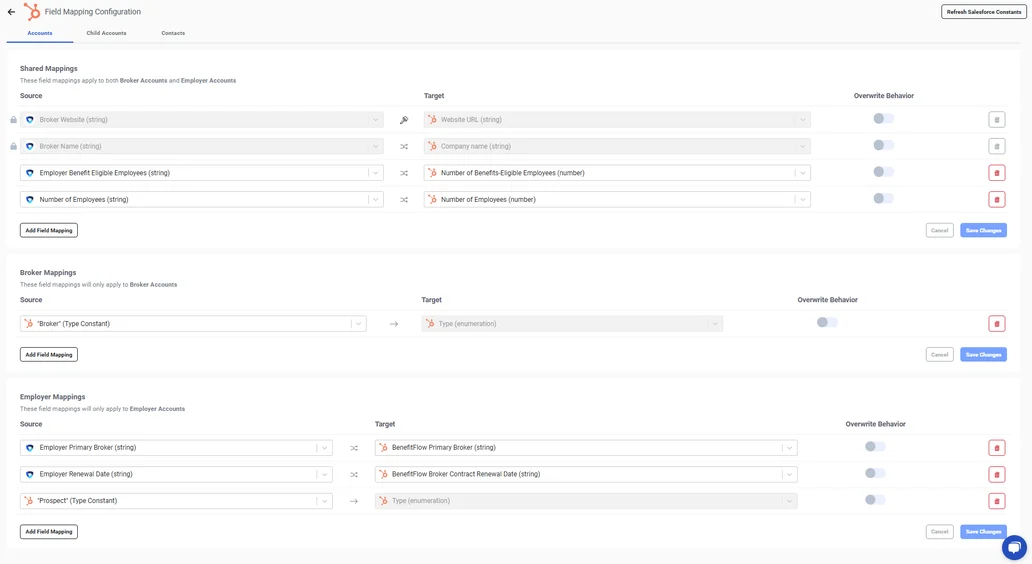 **Tip:** Admins can choose to toggle on/off "Allow Overwrite" on a field-by-field basis. When overwrite is turned 'off', BenefitFlow will only write to the field if it's current value is 'null' in your CRM. If turned 'on', BenefitFlow will overwrite any pre-existing values.
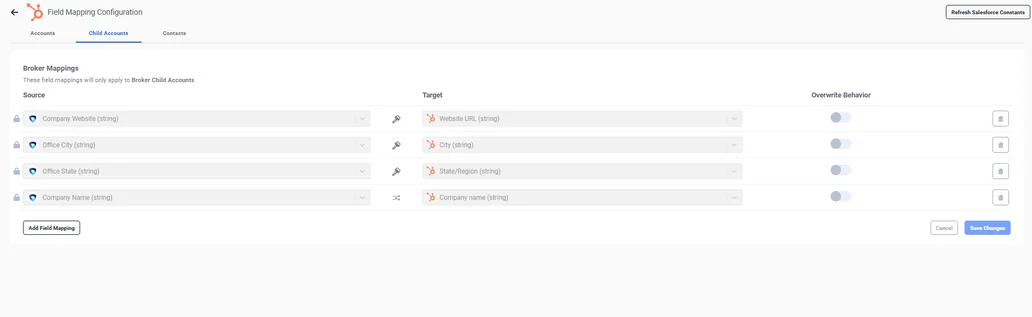
### Mapping Table for Child Accounts
*(for syncing Broker Office records)*
**Tip:** Admins can choose to toggle on/off "Allow Overwrite" on a field-by-field basis. When overwrite is turned 'off', BenefitFlow will only write to the field if it's current value is 'null' in your CRM. If turned 'on', BenefitFlow will overwrite any pre-existing values.
### Mapping Table for Child Accounts
*(for syncing Broker Office records)*
 ### Mapping Table for Contacts
*(for syncing Employer and Broker Contact records)*
### Mapping Table for Contacts
*(for syncing Employer and Broker Contact records)*
 ## Other FAQs
BenefitFlow Admin permissions are required to authenticate with your CRM and configure field mappings. **Your BenefitFlow Customer Success Manager can provide the relevant user(s) with those permissions.**
That user also requires Salesforce, Dynamics, or HubSpot Admin permissions to provide Read/Write access to BenefitFlow.
Both standard users and admin users can sync data once the integration is set up. Admin users always have full sync access and can also manage field mappings and connection settings.
By default, standard users can only create **net-new** records in the CRM. However, admins can configure what sync operations standard users are allowed to perform — per object type (Contacts and Accounts) — under **Integration Settings > Preferences > Sync Permissions for Standard Users**.
The available options are:
* **Create new and update existing**
* **Create new only** (default)
* **Update existing only**
Leads inherit the permissions set for Contacts.
## Other FAQs
BenefitFlow Admin permissions are required to authenticate with your CRM and configure field mappings. **Your BenefitFlow Customer Success Manager can provide the relevant user(s) with those permissions.**
That user also requires Salesforce, Dynamics, or HubSpot Admin permissions to provide Read/Write access to BenefitFlow.
Both standard users and admin users can sync data once the integration is set up. Admin users always have full sync access and can also manage field mappings and connection settings.
By default, standard users can only create **net-new** records in the CRM. However, admins can configure what sync operations standard users are allowed to perform — per object type (Contacts and Accounts) — under **Integration Settings > Preferences > Sync Permissions for Standard Users**.
The available options are:
* **Create new and update existing**
* **Create new only** (default)
* **Update existing only**
Leads inherit the permissions set for Contacts.
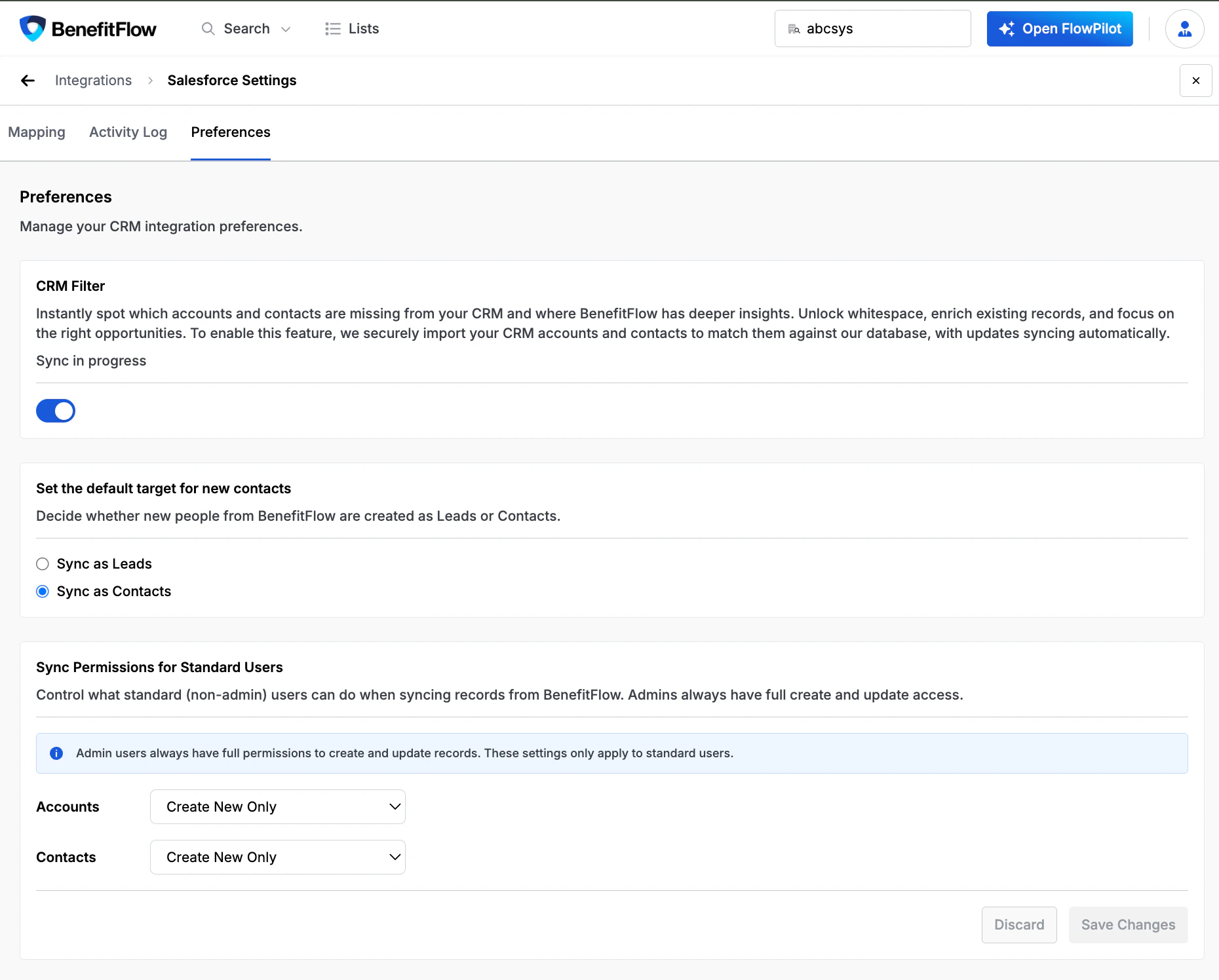 The default setting ("Create new only") matches BenefitFlow's previous behavior. No action is needed unless you want to grant standard users additional sync capabilities.
BenefitFlow authenticates using OAuth 2.0 and the integration requires that BenefitFlow has read / write access to the relevant tables and fields in your CRM.
When BenefitFlow creates a new contact in your CRM, it assigns the Contact Owner from the **owner of the associated Account** in your CRM. If that account has no owner yet, BenefitFlow leaves the field blank and your CRM's own default assignment rules apply.
Syncing updates to an existing contact never changes its owner. Ownership is not based on who clicked "Get Contact" or who initiated the sync. To set owners explicitly, use **Assign Owner** on the list before syncing (admins can also reassign already-synced contacts).
BenefitFlow does not set an Account Owner when syncing to the Account object.
The default setting ("Create new only") matches BenefitFlow's previous behavior. No action is needed unless you want to grant standard users additional sync capabilities.
BenefitFlow authenticates using OAuth 2.0 and the integration requires that BenefitFlow has read / write access to the relevant tables and fields in your CRM.
When BenefitFlow creates a new contact in your CRM, it assigns the Contact Owner from the **owner of the associated Account** in your CRM. If that account has no owner yet, BenefitFlow leaves the field blank and your CRM's own default assignment rules apply.
Syncing updates to an existing contact never changes its owner. Ownership is not based on who clicked "Get Contact" or who initiated the sync. To set owners explicitly, use **Assign Owner** on the list before syncing (admins can also reassign already-synced contacts).
BenefitFlow does not set an Account Owner when syncing to the Account object.