> ## Documentation Index
> Fetch the complete documentation index at: https://docs.benefitflow.com/llms.txt
> Use this file to discover all available pages before exploring further.
# Employer Profiles
> How to read and use employer profile views in BenefitFlow
Every employer in BenefitFlow has a multi-dimensional profile built from Form 5500 filings, contact data, and AI-powered research. Here's what each tab contains.
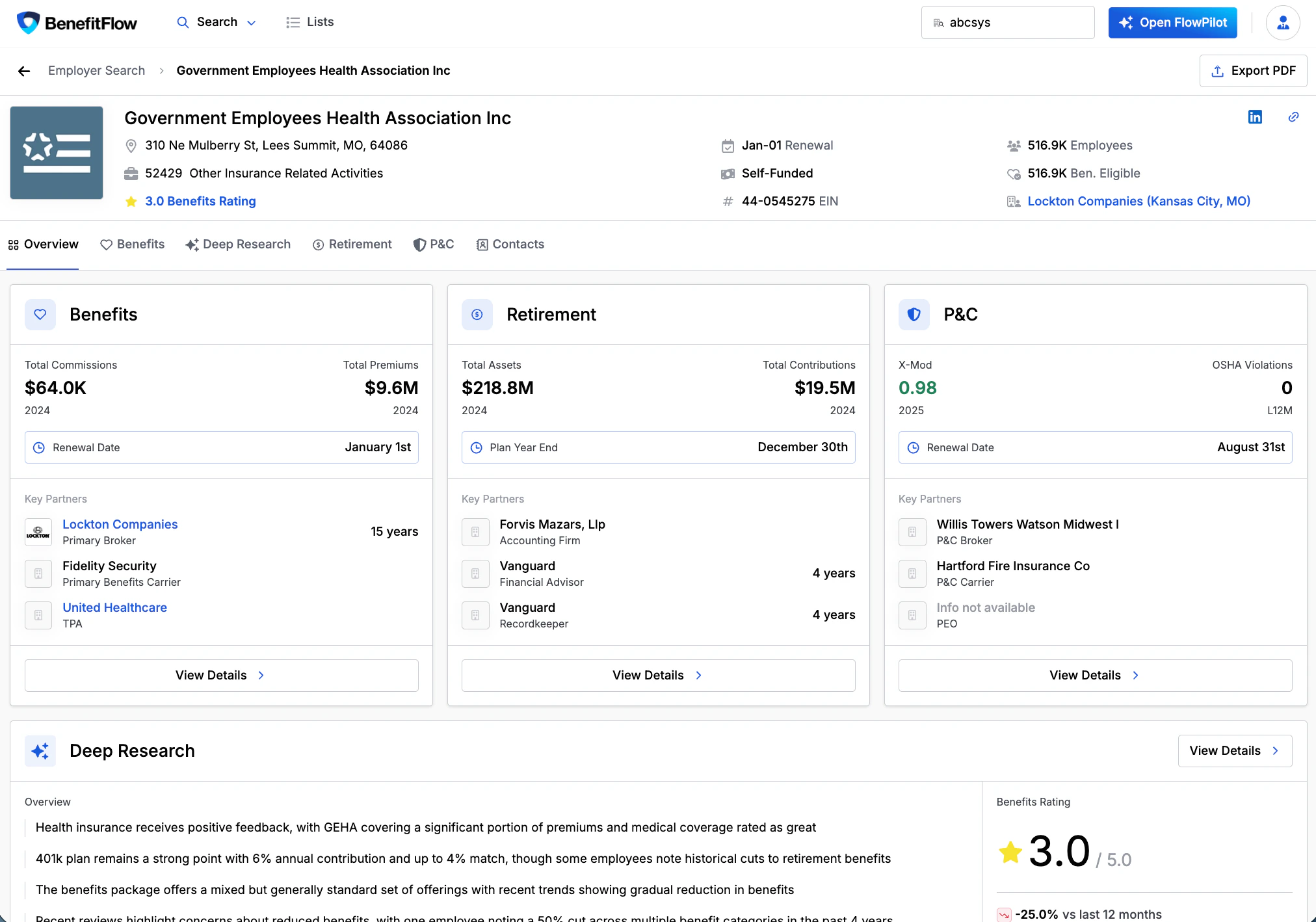 ## Company Overview
* Headquarters location
* Employee count
* Funding status (self-funded or fully insured)
* Primary broker information
## Benefits Tab
* **Key Partners** — brokers, carriers, and vendors associated with the employer
* Policy-level insights from Form 5500 filings
* Filterable by policy type (Medical, Dental, Vision)
* Broker commission and carrier premium summaries
## Policy Details
Line-item breakdowns for each policy:
* Coverage specifics
* Renewal dates
* Commissions and premiums
* Implied Per Employee Per Month (PEPM) costs
## History Tab
* Enrollment trends over time
* Broker of record changes
* Carrier modifications
* Filterable by policy type
## Deep Research Tab
AI-powered insights beyond Form 5500 data:
* Employee benefit ratings and sentiment analysis
* Health insurance, wellness programs, family benefits, career growth
* Vendor information
How BenefitFlow generates AI-powered employer insights
## Signals Tab
Live trigger events for this employer: upcoming renewals, broker or carrier changes, sentiment shifts, compliance flags, and more. The count on the tab shows how many signals are active right now.
Every signal type and how to act on them
## Contacts Tab
* Form 5500 signatory
* Key HR and executive contacts
How we source and verify contact information
***
Use the search bar at the top of the tab to find a specific person without scrolling the full list.
## Related
AI-powered employer insights beyond Form 5500
How Form 5500 data powers BenefitFlow
How contact credits work and how to export data
Create targeted outreach lists from search results
## Company Overview
* Headquarters location
* Employee count
* Funding status (self-funded or fully insured)
* Primary broker information
## Benefits Tab
* **Key Partners** — brokers, carriers, and vendors associated with the employer
* Policy-level insights from Form 5500 filings
* Filterable by policy type (Medical, Dental, Vision)
* Broker commission and carrier premium summaries
## Policy Details
Line-item breakdowns for each policy:
* Coverage specifics
* Renewal dates
* Commissions and premiums
* Implied Per Employee Per Month (PEPM) costs
## History Tab
* Enrollment trends over time
* Broker of record changes
* Carrier modifications
* Filterable by policy type
## Deep Research Tab
AI-powered insights beyond Form 5500 data:
* Employee benefit ratings and sentiment analysis
* Health insurance, wellness programs, family benefits, career growth
* Vendor information
How BenefitFlow generates AI-powered employer insights
## Signals Tab
Live trigger events for this employer: upcoming renewals, broker or carrier changes, sentiment shifts, compliance flags, and more. The count on the tab shows how many signals are active right now.
Every signal type and how to act on them
## Contacts Tab
* Form 5500 signatory
* Key HR and executive contacts
How we source and verify contact information
***
Use the search bar at the top of the tab to find a specific person without scrolling the full list.
## Related
AI-powered employer insights beyond Form 5500
How Form 5500 data powers BenefitFlow
How contact credits work and how to export data
Create targeted outreach lists from search results