> ## Documentation Index
> Fetch the complete documentation index at: https://docs.benefitflow.com/llms.txt
> Use this file to discover all available pages before exploring further.
# Filter Glossary
> Every BenefitFlow search filter, what it does, and where the data comes from
BenefitFlow filters are grouped by what you are searching for: employers, brokers, or contacts. This page lists every filter, what it does, and where the underlying data comes from.
Many filters appear in more than one search. Employer attributes (industry, benefits, retirement, P\&C) are available whether you are searching Employers, a broker's book of business, or Employer Contacts. To keep things readable, each filter is documented once under its primary search, with notes on where else it shows up.
## How filters work
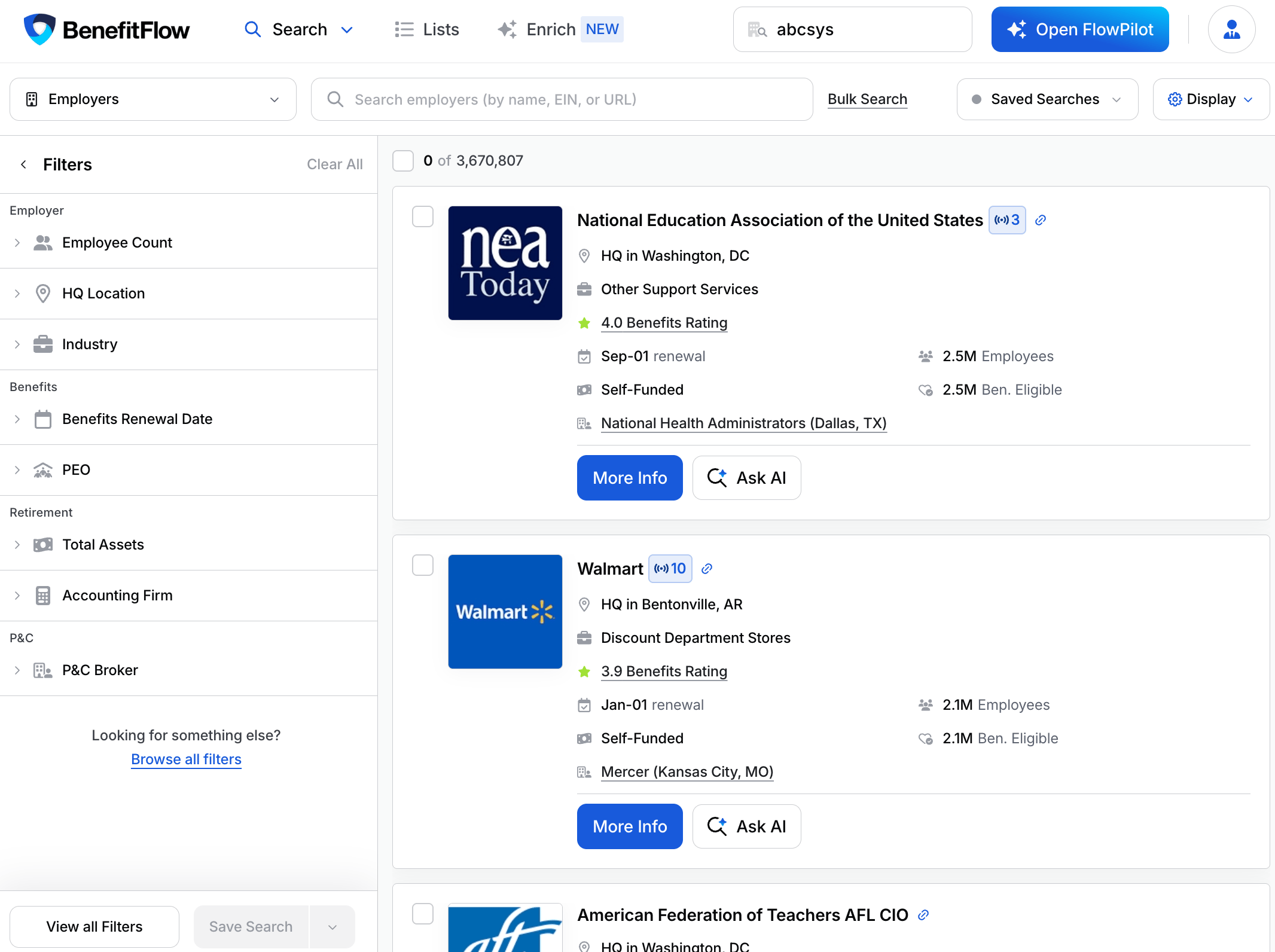
Your filter panel shows a focused set of filters up front, the ones most people use, so you're not scrolling past dozens of options to reach the one you want. Everything else is one click away, and you can pin the filters you use most so they stay at the top.
### Show all filters
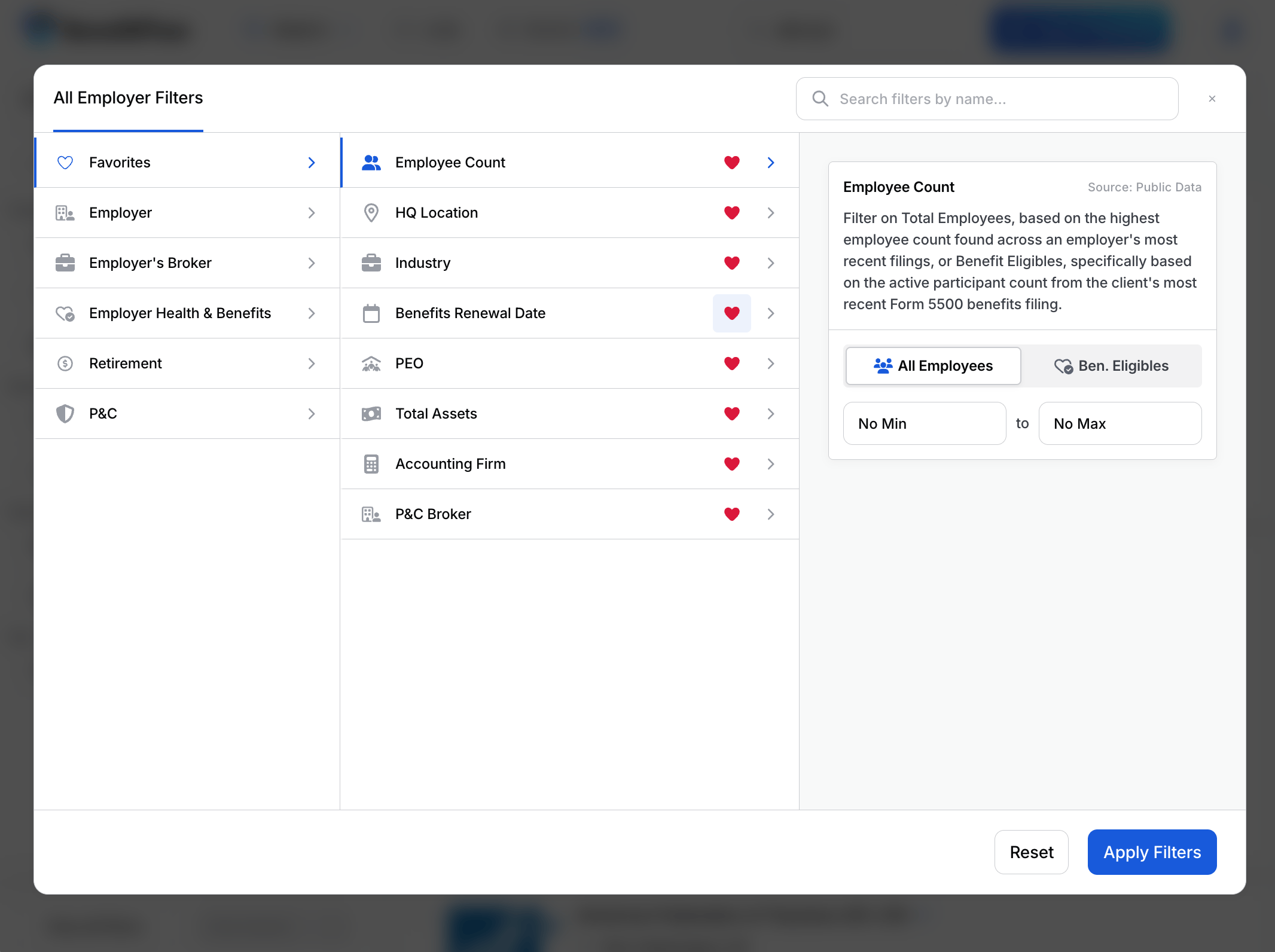
Under the filter panel, click **Browse all filters** to open the full list. Filters are grouped by category (Employer, Employer's Broker, Employer Health & Benefits, Retirement, P\&C), and you can search by name. Set the filters you want, then click **Apply Filters**.
 ### Favorite the filters you use most
Click the **heart** next to any filter to add it to your **Favorites**. Favorited filters pin to the top of your filter panel on every search, so your go-to filters are always one click away. Click the heart again to remove one. Your favorites also live under the **Favorites** tab in the All Filters window.
### Favorite the filters you use most
Click the **heart** next to any filter to add it to your **Favorites**. Favorited filters pin to the top of your filter panel on every search, so your go-to filters are always one click away. Click the heart again to remove one. Your favorites also live under the **Favorites** tab in the All Filters window.
 ## Where the data comes from
Sources use the same definitions as the [Data Glossary](/knowledge-base/data-glossary).
| Source | What it means |
| -------------------------- | --------------------------------------------- |
| Form 5500 | Federal benefits and retirement plan filings |
| Form 5500 (calculated) | Derived from Form 5500 data |
| State-level filings | State property and casualty filings |
| NCCI / State regulators | Experience modification (X-Mod) data |
| FMCSA | Federal motor carrier and fleet records |
| U.S. Dept. of Labor | Federal workplace safety (OSHA) records |
| State DOI | State Department of Insurance licensing data |
| Employee review platforms | Public employee-review sites |
| Deep Research | BenefitFlow AI reading public web content |
| Proprietary | BenefitFlow-derived data and logic |
| Public profiles & partners | Public profiles and third-party data partners |
| System | Your BenefitFlow account and platform data |
## How filters work
Two controls apply across the catalog:
* **Presence.** Qualifying filters (PEO, Benefits Broker, Benefits Carrier, P\&C Broker, P\&C Carrier, Recordkeeper) ask two questions separately: does the employer have one at all (**Any / None**), and if so, **which one**. Use Any to find everyone with a PEO; pick a name to find users of that specific PEO.
* **Include and exclude.** Every filter supports both. Excluded values show struck through in the filter panel, and results leave them out.
## Employer Search
### Company
| Filter | What it does | Source |
| -------------- | ------------------------------------------------------------------------------------------------------------------------------------------------------------------------ | --------- |
| Company Name | Search by company name, EIN, website, or domain. Paste a list to look up many at once, or paste a single URL straight into the main search bar (works in FlowPilot too). | Form 5500 |
| Employee Count | Total employees, from the largest count across recent filings. You can also filter on Benefit Eligibles (active participants on the most recent benefits filing). | Form 5500 |
| HQ Location | Filter by headquarters city, state, region, or ZIP. Paste ZIPs in bulk or add a radius. | Form 5500 |
| Industry | Filter by industry. Type an industry name or a NAICS code. | Form 5500 |
| Employer Type | Single-employer vs multiemployer, as listed on the Form 5500. Multiemployer is typically union-sponsored. | Form 5500 |
### Health & Benefits
| Filter | What it does | Source |
| ---------------------- | ---------------------------------------------------------------------------------------------------------------------------------------------------------------- | ------------------------- |
| Benefits Rating | A 0 to 5 star read on an employer's benefits, based on how employees rate them. Low scores can flag dissatisfaction. | Employee review platforms |
| Benefits Mentioned | Specific benefits found mentioned online, beyond what the 5500 shows. | Deep Research |
| Funding | Self-funded vs fully insured. Implied from filing evidence, so treat it as a strong signal, not a guarantee. | Form 5500 |
| Insurance Products | Line of coverage such as Medical, Dental, Vision, Life, Disability, or Stop-Loss. Pair with Benefits Carrier to find combinations like "Aetna for Dental." | Form 5500 |
| Benefits Renewal Date | Renewal month of the employer's largest benefits policy by premium. Good for timing outreach. | Form 5500 |
| Benefits Carrier | Employers using a given carrier (e.g. Aetna). Pair with Insurance Products to narrow to one line. | Form 5500 |
| Benefits Broker | The employer's benefits broker or agency of record. | Form 5500 |
| Broker Commissions | Commission dollars as a percent of premium for a policy. Find employers paying above or below benchmark, optionally by line. | Form 5500 |
| Broker Office Location | The office location of the employer's primary broker. Filter by city, state, region, or ZIP. | Proprietary |
| Broker Size | Size of the employer's primary broker by state footprint: Local (1 state), Regional (2 to 10), Multi-Regional (11 to 30), National (more than 30). | Proprietary |
| Broker Tenure | How long the employer has been with its current primary broker, in years. Newer relationships may still be in play; long-tenured ones may be ready for a change. | Form 5500 (calculated) |
| Vendors Mentioned | Benefits vendors found mentioned online (carriers, wellness, point solutions). Carriers can also be searched via Benefits Carrier, which uses 5500 data. | Deep Research |
| PEO | Whether the employer uses a PEO such as ADP, Insperity, or TriNet. | Form 5500 |
### Retirement
| Filter | What it does | Source |
| ----------------- | ----------------------------------------------------------------------------------------------------------------------- | --------- |
| Plan Type | Retirement plan type such as 401(k), 403(b), or Defined Benefit. | Form 5500 |
| Plan Features | Plan features such as auto-enrollment, Roth option, or employer match. | Form 5500 |
| Total Assets | Total assets held in the employer's retirement plan. | Form 5500 |
| Financial Advisor | The advisor or investment advisor on the retirement plan. | Form 5500 |
| Recordkeeper | The plan's recordkeeper (e.g. Fidelity, Vanguard, Empower). Distinct from Vendors Mentioned, which comes from web data. | Form 5500 |
| Accounting Firm | The firm that audits the retirement plan. | Form 5500 |
### P\&C
| Filter | What it does | Source |
| ----------------- | ---------------------------------------------------------------------------------------------------------- | ----------------------- |
| P\&C Renewal Date | Renewal month of the employer's property and casualty (workers' comp) policy. | State-level filings |
| P\&C Carrier | Carrier of record on the employer's P\&C policy. | State-level filings |
| P\&C Broker | Broker of record on the employer's P\&C policy. | State-level filings |
| DOT Inspections | Employers with DOT inspection history. Surfaces active fleet operations. | FMCSA |
| Vehicles | Number of commercial vehicles in the employer's fleet. | FMCSA |
| Miles Driven | Annual miles driven by the employer's fleet. | FMCSA |
| X-Mod Factor | Workers' comp experience modification factor. Below 1.0 is better-than-average safety, above 1.0 is worse. | NCCI / State regulators |
| OSHA Inspections | Employers with OSHA inspection or citation history. | U.S. Dept. of Labor |
## Broker Search
Find brokerages and filter by their book of business. Primary Broker, Broker Tenure, and Broker Commissions are also available as filters on a broker office's Clients list.
| Filter | What it does | Source |
| ------------------ | -------------------------------------------------------------------------------------------------------------------------------- | ---------------------- |
| Broker Name | Search by broker name, website, or domain. | Proprietary |
| Office Location | Filter by where the broker has offices: city, state, region, or ZIP. | Proprietary |
| Broker Size | Footprint by number of states with an office: Local (1), Regional (2 to 10), Multi-Regional (11 to 30), National (more than 30). | Proprietary |
| Broker Tenure | How long the broker has held its client relationships, in years. | Form 5500 (calculated) |
| Primary Broker | When on, only count clients where this broker is the primary broker (the one earning the most commissions). | Form 5500 |
| Broker Commissions | Commission dollars as a percent of premium across the book. | Form 5500 |
You can also filter brokers by any attribute of their clients (book of business) using the same Employer filters above: Industry, Employee Count, Benefits Carrier, Funding, P\&C, and more.
## Contact Search
Find people. Two flavors share the core filters below: **Employer Contacts** (benefits buyers at employers) and **Broker Contacts** (people at brokerages).
| Filter | What it does | Source |
| ---------------- | --------------------------------------------------------------------------------------------------------------------------------- | -------------------------- |
| Company Name | Find contacts by the company they work at. | Public profiles & partners |
| Contact Location | Filter by the contact's work location: city, state, region, or ZIP. | Public profiles & partners |
| Role | Functional role category (Executive, HR, Finance, Operations, Benefits). Use for broad groups; use Job Title for specific titles. | Proprietary |
| Job Title | Filter by job title (e.g. HR Director, Benefits Manager, CFO). Search predefined categories or enter an exact term. | Public profiles & partners |
| Years At Company | How long the contact has been at their current company. From reported start dates, so it may be incomplete. | Public profiles & partners |
| Contact Details | Filter to contacts that have a work email, a phone number, or both. | Public profiles & partners |
| Credit Usage | Filter by whether you have already unlocked a contact with credits. | System |
| CRM | Filter by whether the contact already exists in your connected CRM. | System |
**Broker Contacts also offer:**
| Filter | What it does | Source |
| -------------------- | ------------------------------------------------------------------------------- | --------- |
| License Type | Broker contacts licensed to sell health, life, property, or casualty insurance. | State DOI |
| Carrier Appointments | Which carriers a broker contact is officially appointed with. | State DOI |
When searching Employer Contacts you can also filter on every Employer attribute above (Industry, Benefits Carrier, Retirement, P\&C, and more) to target people by their employer's profile. Broker Contacts can also be filtered by broker Office Location and Broker Size.
## Where the data comes from
Sources use the same definitions as the [Data Glossary](/knowledge-base/data-glossary).
| Source | What it means |
| -------------------------- | --------------------------------------------- |
| Form 5500 | Federal benefits and retirement plan filings |
| Form 5500 (calculated) | Derived from Form 5500 data |
| State-level filings | State property and casualty filings |
| NCCI / State regulators | Experience modification (X-Mod) data |
| FMCSA | Federal motor carrier and fleet records |
| U.S. Dept. of Labor | Federal workplace safety (OSHA) records |
| State DOI | State Department of Insurance licensing data |
| Employee review platforms | Public employee-review sites |
| Deep Research | BenefitFlow AI reading public web content |
| Proprietary | BenefitFlow-derived data and logic |
| Public profiles & partners | Public profiles and third-party data partners |
| System | Your BenefitFlow account and platform data |
## How filters work
Two controls apply across the catalog:
* **Presence.** Qualifying filters (PEO, Benefits Broker, Benefits Carrier, P\&C Broker, P\&C Carrier, Recordkeeper) ask two questions separately: does the employer have one at all (**Any / None**), and if so, **which one**. Use Any to find everyone with a PEO; pick a name to find users of that specific PEO.
* **Include and exclude.** Every filter supports both. Excluded values show struck through in the filter panel, and results leave them out.
## Employer Search
### Company
| Filter | What it does | Source |
| -------------- | ------------------------------------------------------------------------------------------------------------------------------------------------------------------------ | --------- |
| Company Name | Search by company name, EIN, website, or domain. Paste a list to look up many at once, or paste a single URL straight into the main search bar (works in FlowPilot too). | Form 5500 |
| Employee Count | Total employees, from the largest count across recent filings. You can also filter on Benefit Eligibles (active participants on the most recent benefits filing). | Form 5500 |
| HQ Location | Filter by headquarters city, state, region, or ZIP. Paste ZIPs in bulk or add a radius. | Form 5500 |
| Industry | Filter by industry. Type an industry name or a NAICS code. | Form 5500 |
| Employer Type | Single-employer vs multiemployer, as listed on the Form 5500. Multiemployer is typically union-sponsored. | Form 5500 |
### Health & Benefits
| Filter | What it does | Source |
| ---------------------- | ---------------------------------------------------------------------------------------------------------------------------------------------------------------- | ------------------------- |
| Benefits Rating | A 0 to 5 star read on an employer's benefits, based on how employees rate them. Low scores can flag dissatisfaction. | Employee review platforms |
| Benefits Mentioned | Specific benefits found mentioned online, beyond what the 5500 shows. | Deep Research |
| Funding | Self-funded vs fully insured. Implied from filing evidence, so treat it as a strong signal, not a guarantee. | Form 5500 |
| Insurance Products | Line of coverage such as Medical, Dental, Vision, Life, Disability, or Stop-Loss. Pair with Benefits Carrier to find combinations like "Aetna for Dental." | Form 5500 |
| Benefits Renewal Date | Renewal month of the employer's largest benefits policy by premium. Good for timing outreach. | Form 5500 |
| Benefits Carrier | Employers using a given carrier (e.g. Aetna). Pair with Insurance Products to narrow to one line. | Form 5500 |
| Benefits Broker | The employer's benefits broker or agency of record. | Form 5500 |
| Broker Commissions | Commission dollars as a percent of premium for a policy. Find employers paying above or below benchmark, optionally by line. | Form 5500 |
| Broker Office Location | The office location of the employer's primary broker. Filter by city, state, region, or ZIP. | Proprietary |
| Broker Size | Size of the employer's primary broker by state footprint: Local (1 state), Regional (2 to 10), Multi-Regional (11 to 30), National (more than 30). | Proprietary |
| Broker Tenure | How long the employer has been with its current primary broker, in years. Newer relationships may still be in play; long-tenured ones may be ready for a change. | Form 5500 (calculated) |
| Vendors Mentioned | Benefits vendors found mentioned online (carriers, wellness, point solutions). Carriers can also be searched via Benefits Carrier, which uses 5500 data. | Deep Research |
| PEO | Whether the employer uses a PEO such as ADP, Insperity, or TriNet. | Form 5500 |
### Retirement
| Filter | What it does | Source |
| ----------------- | ----------------------------------------------------------------------------------------------------------------------- | --------- |
| Plan Type | Retirement plan type such as 401(k), 403(b), or Defined Benefit. | Form 5500 |
| Plan Features | Plan features such as auto-enrollment, Roth option, or employer match. | Form 5500 |
| Total Assets | Total assets held in the employer's retirement plan. | Form 5500 |
| Financial Advisor | The advisor or investment advisor on the retirement plan. | Form 5500 |
| Recordkeeper | The plan's recordkeeper (e.g. Fidelity, Vanguard, Empower). Distinct from Vendors Mentioned, which comes from web data. | Form 5500 |
| Accounting Firm | The firm that audits the retirement plan. | Form 5500 |
### P\&C
| Filter | What it does | Source |
| ----------------- | ---------------------------------------------------------------------------------------------------------- | ----------------------- |
| P\&C Renewal Date | Renewal month of the employer's property and casualty (workers' comp) policy. | State-level filings |
| P\&C Carrier | Carrier of record on the employer's P\&C policy. | State-level filings |
| P\&C Broker | Broker of record on the employer's P\&C policy. | State-level filings |
| DOT Inspections | Employers with DOT inspection history. Surfaces active fleet operations. | FMCSA |
| Vehicles | Number of commercial vehicles in the employer's fleet. | FMCSA |
| Miles Driven | Annual miles driven by the employer's fleet. | FMCSA |
| X-Mod Factor | Workers' comp experience modification factor. Below 1.0 is better-than-average safety, above 1.0 is worse. | NCCI / State regulators |
| OSHA Inspections | Employers with OSHA inspection or citation history. | U.S. Dept. of Labor |
## Broker Search
Find brokerages and filter by their book of business. Primary Broker, Broker Tenure, and Broker Commissions are also available as filters on a broker office's Clients list.
| Filter | What it does | Source |
| ------------------ | -------------------------------------------------------------------------------------------------------------------------------- | ---------------------- |
| Broker Name | Search by broker name, website, or domain. | Proprietary |
| Office Location | Filter by where the broker has offices: city, state, region, or ZIP. | Proprietary |
| Broker Size | Footprint by number of states with an office: Local (1), Regional (2 to 10), Multi-Regional (11 to 30), National (more than 30). | Proprietary |
| Broker Tenure | How long the broker has held its client relationships, in years. | Form 5500 (calculated) |
| Primary Broker | When on, only count clients where this broker is the primary broker (the one earning the most commissions). | Form 5500 |
| Broker Commissions | Commission dollars as a percent of premium across the book. | Form 5500 |
You can also filter brokers by any attribute of their clients (book of business) using the same Employer filters above: Industry, Employee Count, Benefits Carrier, Funding, P\&C, and more.
## Contact Search
Find people. Two flavors share the core filters below: **Employer Contacts** (benefits buyers at employers) and **Broker Contacts** (people at brokerages).
| Filter | What it does | Source |
| ---------------- | --------------------------------------------------------------------------------------------------------------------------------- | -------------------------- |
| Company Name | Find contacts by the company they work at. | Public profiles & partners |
| Contact Location | Filter by the contact's work location: city, state, region, or ZIP. | Public profiles & partners |
| Role | Functional role category (Executive, HR, Finance, Operations, Benefits). Use for broad groups; use Job Title for specific titles. | Proprietary |
| Job Title | Filter by job title (e.g. HR Director, Benefits Manager, CFO). Search predefined categories or enter an exact term. | Public profiles & partners |
| Years At Company | How long the contact has been at their current company. From reported start dates, so it may be incomplete. | Public profiles & partners |
| Contact Details | Filter to contacts that have a work email, a phone number, or both. | Public profiles & partners |
| Credit Usage | Filter by whether you have already unlocked a contact with credits. | System |
| CRM | Filter by whether the contact already exists in your connected CRM. | System |
**Broker Contacts also offer:**
| Filter | What it does | Source |
| -------------------- | ------------------------------------------------------------------------------- | --------- |
| License Type | Broker contacts licensed to sell health, life, property, or casualty insurance. | State DOI |
| Carrier Appointments | Which carriers a broker contact is officially appointed with. | State DOI |
When searching Employer Contacts you can also filter on every Employer attribute above (Industry, Benefits Carrier, Retirement, P\&C, and more) to target people by their employer's profile. Broker Contacts can also be filtered by broker Office Location and Broker Size.