> ## Documentation Index
> Fetch the complete documentation index at: https://docs.benefitflow.com/llms.txt
> Use this file to discover all available pages before exploring further.
# Getting Started with FlowPilot
> Learn how to use FlowPilot, BenefitFlow's AI sales assistant, to prospect, research, and draft outreach in minutes, not hours.
## What Is FlowPilot?
FlowPilot is BenefitFlow's AI sales assistant for benefits and insurance professionals. **You describe the outcome; FlowPilot does the legwork** — turning plain-language requests into structured searches, account research, and ready-to-send outreach. No filters to configure, no menus to navigate. FlowPilot is included for all BenefitFlow users at no extra cost.
Built for Benefits & Insurance: FlowPilot runs on BenefitFlow's proprietary dataset across Benefits, P\&C, and retirement — so it answers with real plan data, broker relationships, and renewal timing, not internet guesses.
## What You Can Do with FlowPilot
FlowPilot works across three core jobs:
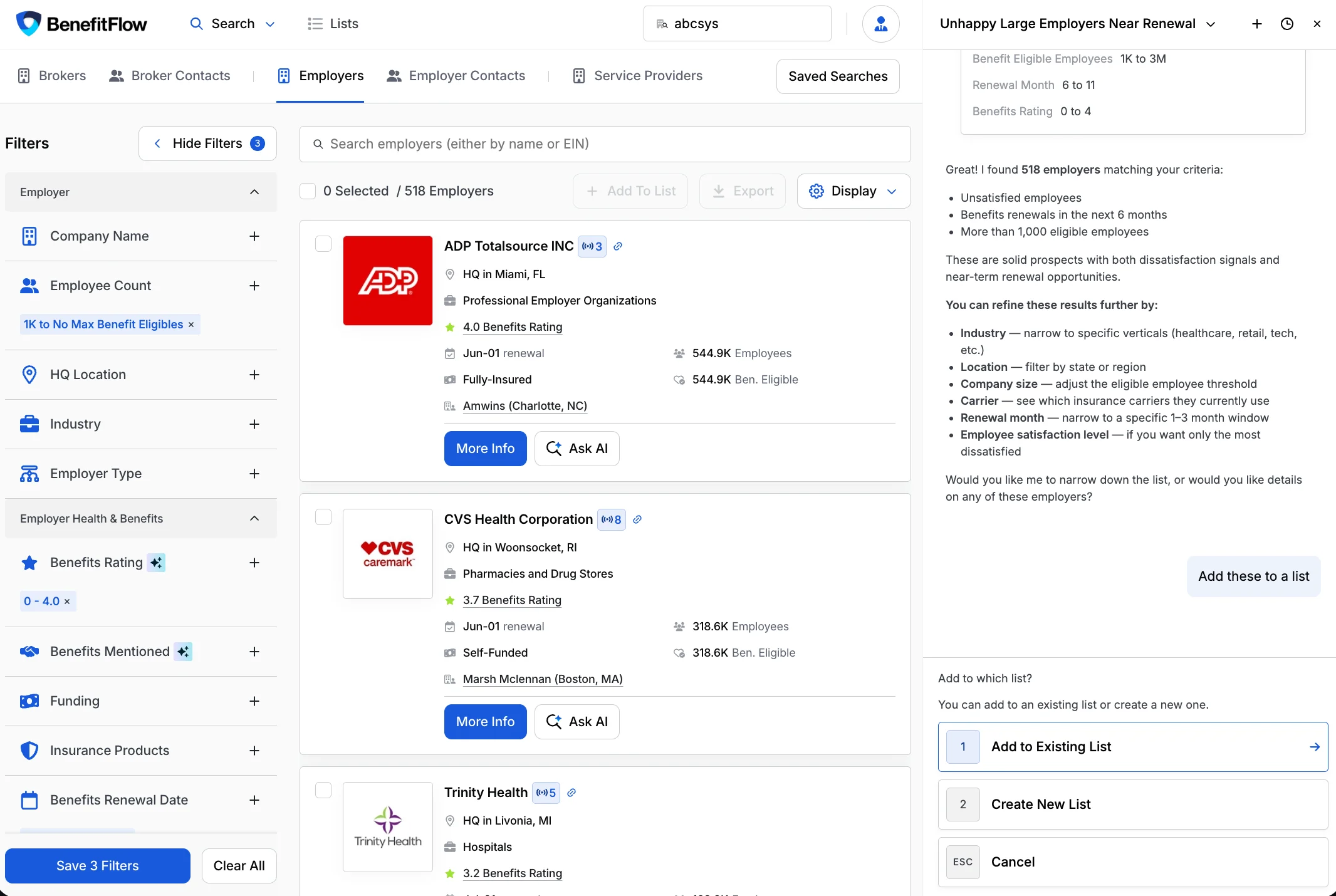
### Build target lists, conversationally
Describe the accounts that fit your ideal customer in plain language and FlowPilot builds the list — ready to research deeper, or save to a list and sync it to your CRM. It searches across 100+ filters for employers, brokers, and contacts.
> *"Show me all self-funded employers in Michigan, 500–1,000 employees, in Retail"* · *"Add these results to my list"*
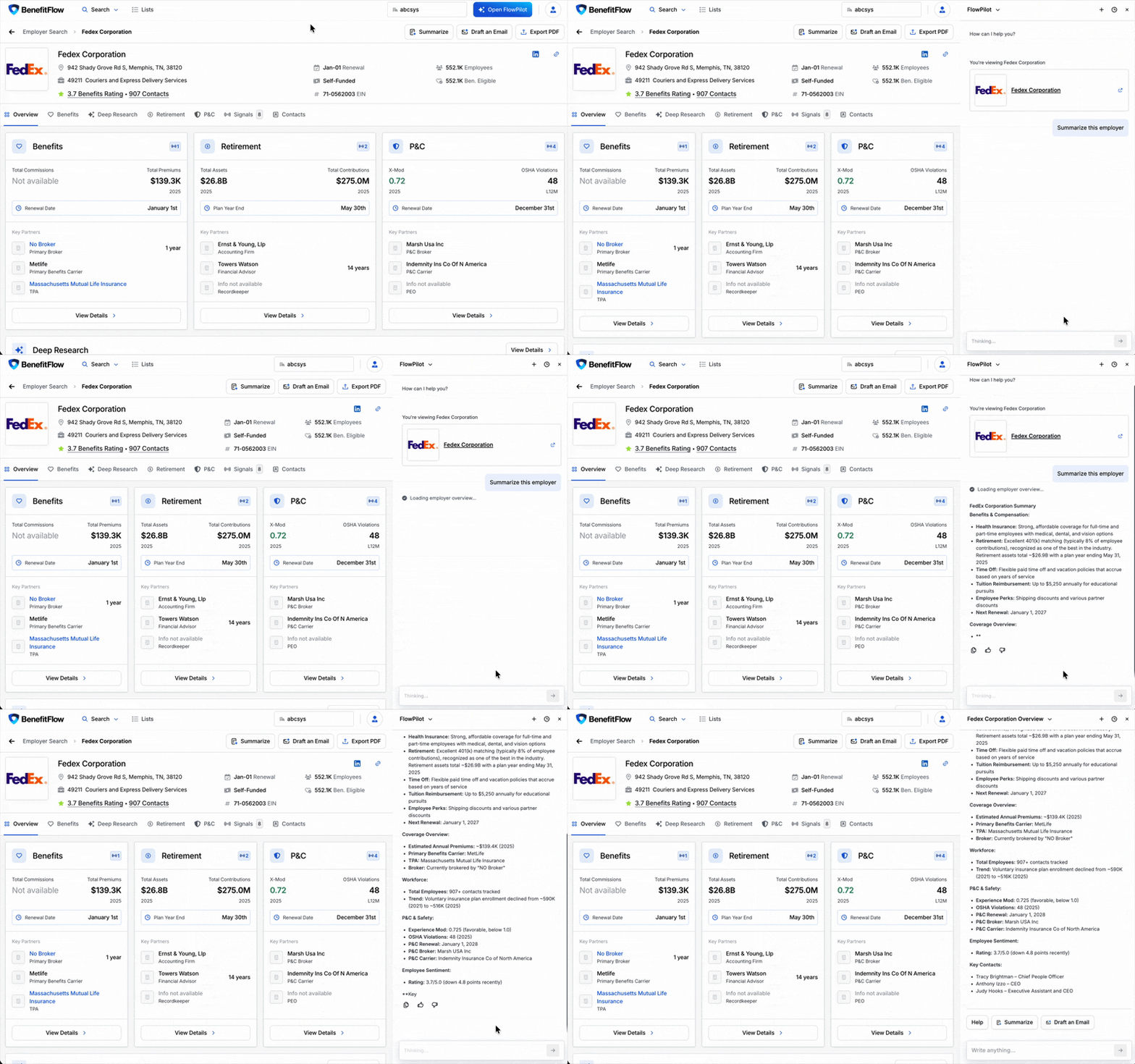
 ### Instantly surface account intelligence
Ask about any company and get a research brief right in the chat — benefits plan history, carrier and broker relationships, renewal timing, and key contacts. On a profile, page-specific prompts surface the right questions automatically.
> *"Summarize this employer's benefits profile"* · *"Give me talking points for my meeting with Acme Corp"*
### Instantly surface account intelligence
Ask about any company and get a research brief right in the chat — benefits plan history, carrier and broker relationships, renewal timing, and key contacts. On a profile, page-specific prompts surface the right questions automatically.
> *"Summarize this employer's benefits profile"* · *"Give me talking points for my meeting with Acme Corp"*
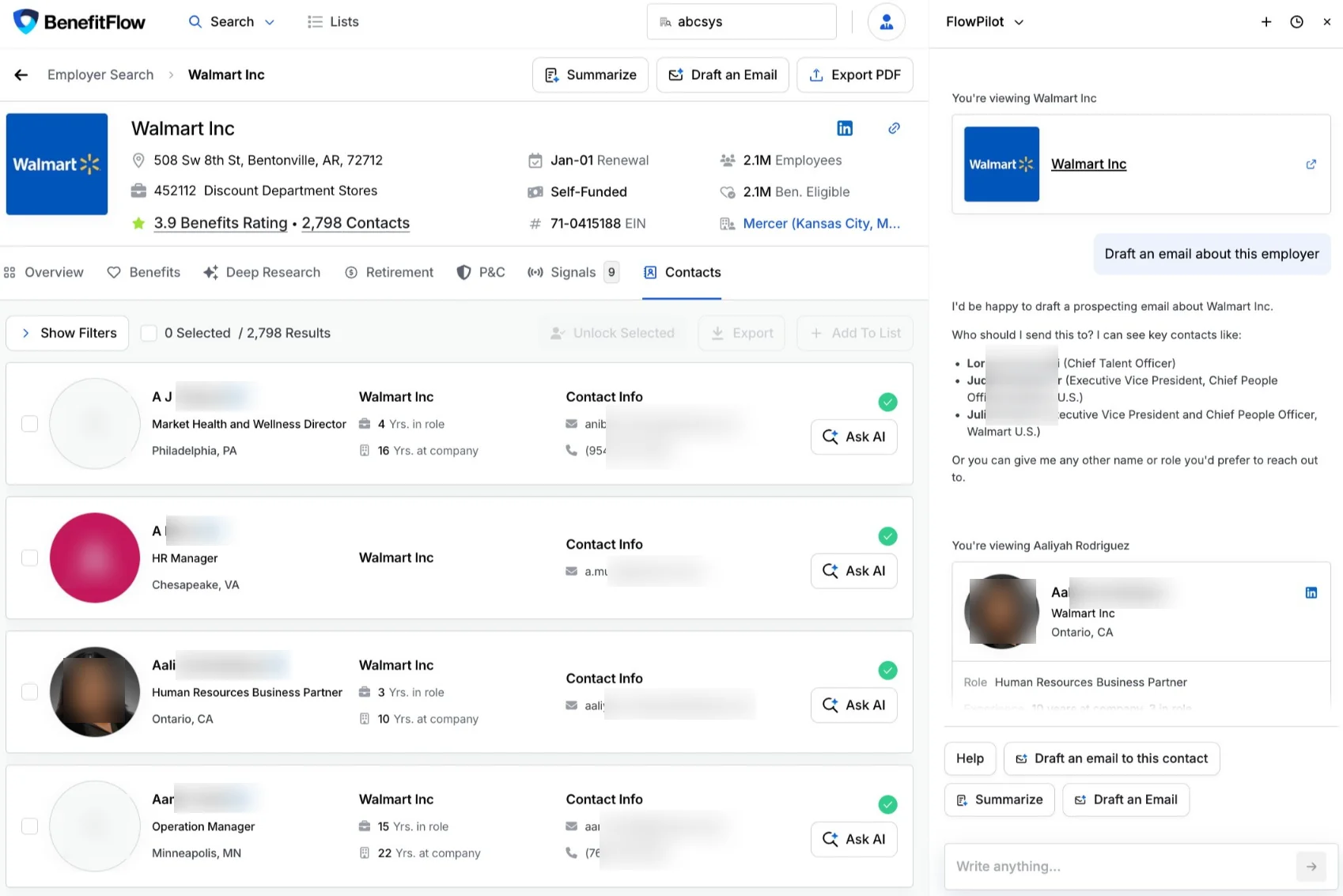
 ### Draft outreach that leads to outcomes
Identify the right decision-maker and generate personalized, ready-to-send outreach — no blank page.
> *"Find the top HR decision-maker and draft a first-touch email"*
### Draft outreach that leads to outcomes
Identify the right decision-maker and generate personalized, ready-to-send outreach — no blank page.
> *"Find the top HR decision-maker and draft a first-touch email"*
 **Plus:** revisit any past conversation from the FlowPilot history menu to pick up where you left off.
**The payoff: GTM in minutes, not hours.** Ask a question, get an answer, take action.
## Where to Find FlowPilot
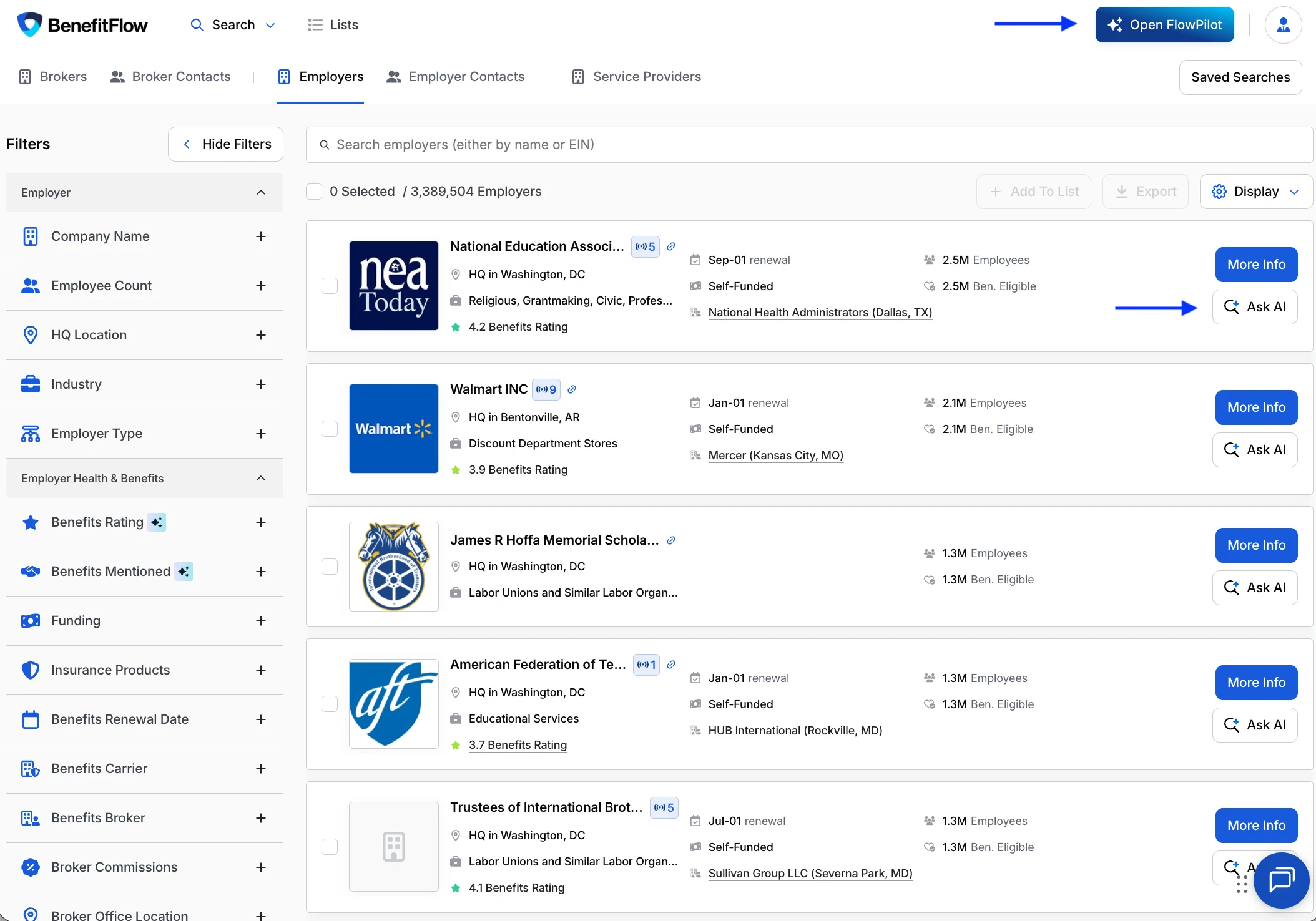
FlowPilot is available across the entire BenefitFlow app. You can open it two ways:
* **Open FlowPilot from the top nav** — Click **Open FlowPilot** (top right) from anywhere to open the assistant.
* **Ask AI on any result** — On a search result, employer, broker, or contact, click **Ask AI** to start FlowPilot with that record already in context.
**Plus:** revisit any past conversation from the FlowPilot history menu to pick up where you left off.
**The payoff: GTM in minutes, not hours.** Ask a question, get an answer, take action.
## Where to Find FlowPilot
FlowPilot is available across the entire BenefitFlow app. You can open it two ways:
* **Open FlowPilot from the top nav** — Click **Open FlowPilot** (top right) from anywhere to open the assistant.
* **Ask AI on any result** — On a search result, employer, broker, or contact, click **Ask AI** to start FlowPilot with that record already in context.
 ## Try These First
Copy and paste any of these into FlowPilot to see it in action:
* **Find prospects by criteria:** `Find employers in Texas with 500+ employees renewing in Q3`
* **Search for brokers:** `Show me brokers in Florida placing dental premium`
* **Draft outreach:** `Draft an intro email for [employer name]`
* **Prep for a meeting:** `Give me talking points for my meeting with [employer name]`
* **Research an employer:** `What can you tell me about [employer name]?`
Replace `[employer name]` with an actual employer in your BenefitFlow database for the best results.
## Tips for Best Results
* **Be specific.** Include the entity type, location, size, and any other criteria that matter.
* **Have the website but not the name?** Paste the company's URL into your prompt and FlowPilot finds the account.
* **One entity type per query.** Stick to employers, brokers, or contacts in a single request.
* **Rephrase rather than follow up.** If a result isn't quite right, start a fresh query with different wording.
* **Use page-specific prompts.** When you're already on a profile, the suggested prompts are tuned to that entity.
## Share Your Feedback
Your feedback directly shapes what gets built next.
* **Rate responses** — Use the thumbs up / thumbs down buttons on any FlowPilot response.
* **Tell your Customer Success Manager** — If something feels off, or FlowPilot surprises you in a good way, reach out to your BenefitFlow point of contact or email [customerteam@benefit-flow.com](mailto:customerteam@benefit-flow.com).
## FAQs
No. FlowPilot is included for all BenefitFlow users across all plans at no additional cost.
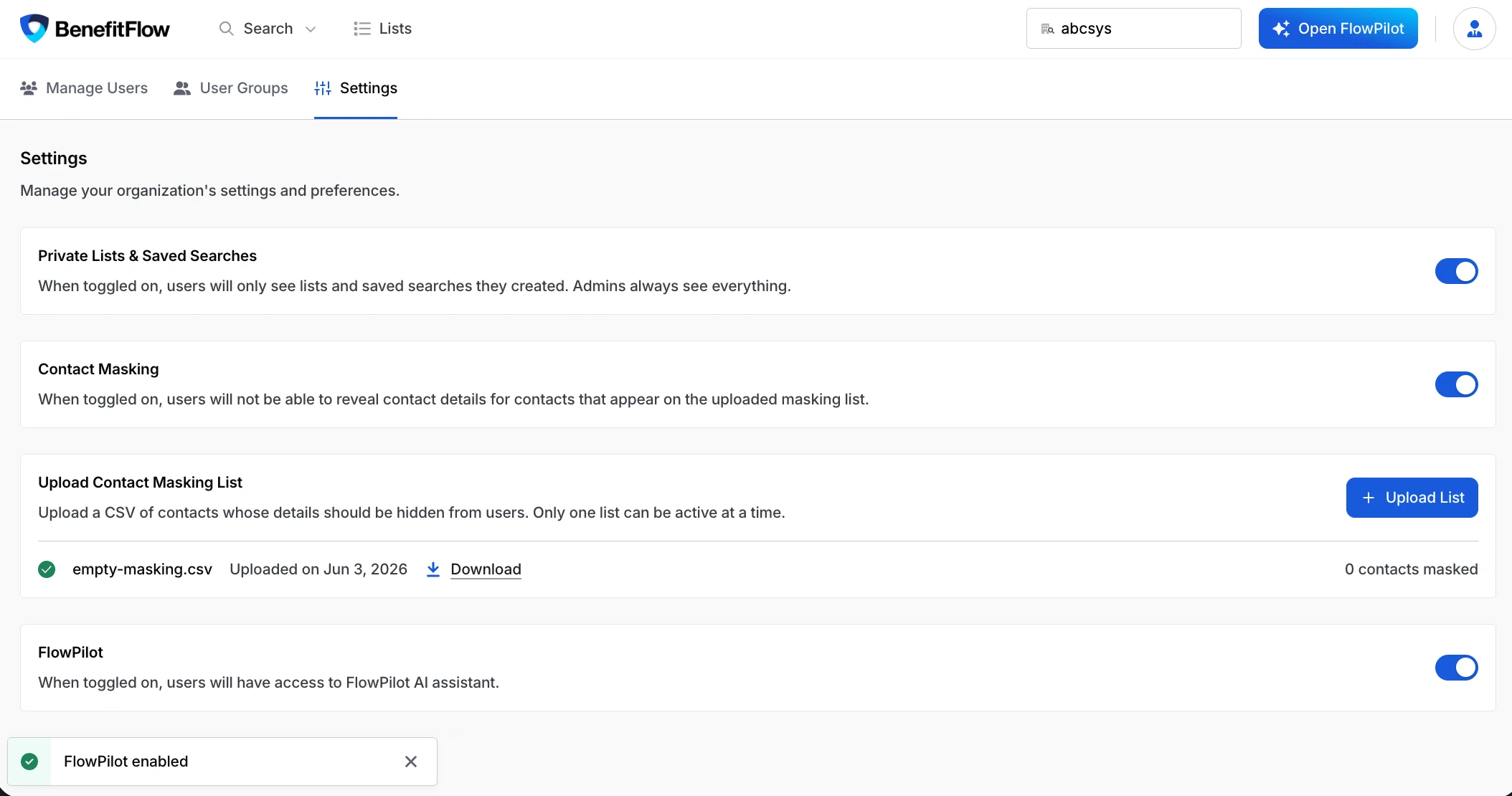
FlowPilot is controlled by a per-team admin toggle in your account settings. Admins can enable or disable it for the team at any time. Some accounts ship with FlowPilot **off by default** — if you don't see it, an admin can switch it on in **[Team Settings](https://benefit-flow.com/Team?tab=settings)**.
## Try These First
Copy and paste any of these into FlowPilot to see it in action:
* **Find prospects by criteria:** `Find employers in Texas with 500+ employees renewing in Q3`
* **Search for brokers:** `Show me brokers in Florida placing dental premium`
* **Draft outreach:** `Draft an intro email for [employer name]`
* **Prep for a meeting:** `Give me talking points for my meeting with [employer name]`
* **Research an employer:** `What can you tell me about [employer name]?`
Replace `[employer name]` with an actual employer in your BenefitFlow database for the best results.
## Tips for Best Results
* **Be specific.** Include the entity type, location, size, and any other criteria that matter.
* **Have the website but not the name?** Paste the company's URL into your prompt and FlowPilot finds the account.
* **One entity type per query.** Stick to employers, brokers, or contacts in a single request.
* **Rephrase rather than follow up.** If a result isn't quite right, start a fresh query with different wording.
* **Use page-specific prompts.** When you're already on a profile, the suggested prompts are tuned to that entity.
## Share Your Feedback
Your feedback directly shapes what gets built next.
* **Rate responses** — Use the thumbs up / thumbs down buttons on any FlowPilot response.
* **Tell your Customer Success Manager** — If something feels off, or FlowPilot surprises you in a good way, reach out to your BenefitFlow point of contact or email [customerteam@benefit-flow.com](mailto:customerteam@benefit-flow.com).
## FAQs
No. FlowPilot is included for all BenefitFlow users across all plans at no additional cost.
FlowPilot is controlled by a per-team admin toggle in your account settings. Admins can enable or disable it for the team at any time. Some accounts ship with FlowPilot **off by default** — if you don't see it, an admin can switch it on in **[Team Settings](https://benefit-flow.com/Team?tab=settings)**.
 Yes. Just ask in plain language — for example, *"Add these search results to my list"* or *"Create a new list called Q4 Texas Prospects and add these."* FlowPilot adds the results to an existing list or creates a new one, right from the chat. You can manage the list anytime from your **Lists** page.
Yes. Ask FlowPilot to unlock a contact's details and it will — but because unlocking uses **contact credits**, FlowPilot asks you to confirm every time. Nothing is unlocked or charged until you approve.
A few things to set expectations:
* **Export to CSV directly** — to export, either **add results to a list** or use the **Export** button in the search UI.
* **Send emails for you** — FlowPilot drafts outreach; you review and send.
* **Update your CRM automatically** — all CRM changes stay user-initiated.
* **Reach outside BenefitFlow** — answers come from BenefitFlow's data, not the open internet or other tools.
Try being more specific — include the entity type (employer, broker, or contact), a location, and key criteria. If follow-up queries aren't working well, start a fresh query instead.
**Questions about data, AI, and security?** See [FlowPilot Security & Data Handling](/knowledge-base/flowpilot-security) for how FlowPilot handles your data, what it can access, and the controls available to your team.
Yes. Just ask in plain language — for example, *"Add these search results to my list"* or *"Create a new list called Q4 Texas Prospects and add these."* FlowPilot adds the results to an existing list or creates a new one, right from the chat. You can manage the list anytime from your **Lists** page.
Yes. Ask FlowPilot to unlock a contact's details and it will — but because unlocking uses **contact credits**, FlowPilot asks you to confirm every time. Nothing is unlocked or charged until you approve.
A few things to set expectations:
* **Export to CSV directly** — to export, either **add results to a list** or use the **Export** button in the search UI.
* **Send emails for you** — FlowPilot drafts outreach; you review and send.
* **Update your CRM automatically** — all CRM changes stay user-initiated.
* **Reach outside BenefitFlow** — answers come from BenefitFlow's data, not the open internet or other tools.
Try being more specific — include the entity type (employer, broker, or contact), a location, and key criteria. If follow-up queries aren't working well, start a fresh query instead.
**Questions about data, AI, and security?** See [FlowPilot Security & Data Handling](/knowledge-base/flowpilot-security) for how FlowPilot handles your data, what it can access, and the controls available to your team.