> ## Documentation Index
> Fetch the complete documentation index at: https://docs.benefitflow.com/llms.txt
> Use this file to discover all available pages before exploring further.
# March/April 2026 Product Updates
> Broker Office Insights, improved list management, new privacy controls, and admin tools.
### Broker Office Insights
A brand new analytical view for any broker office in BenefitFlow — understand their market position, book composition, and growth trajectory at a glance.
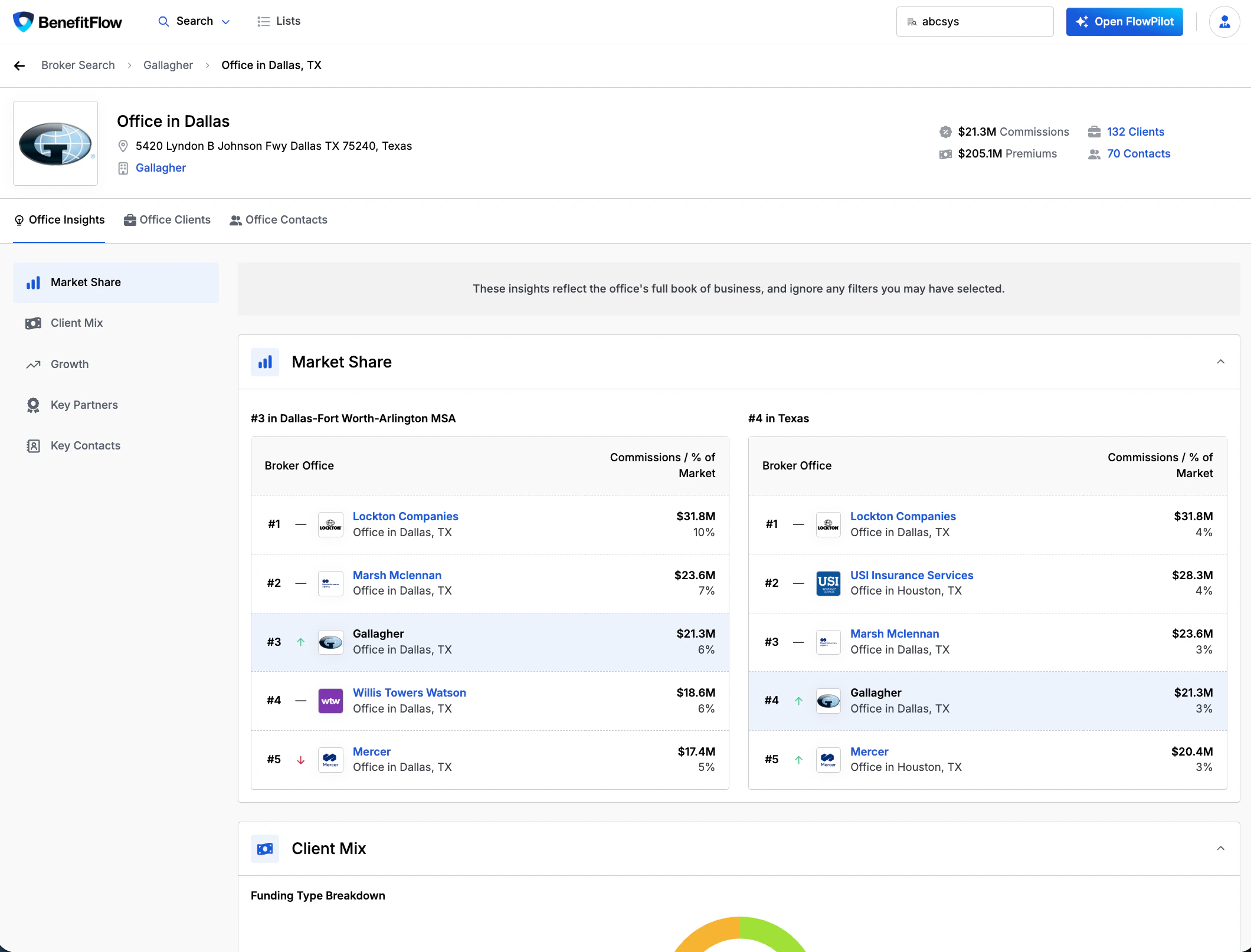 Highlights:
* **Market Share** — see how a broker office ranks in its MSA and state by commissions
* **Client Mix** — funding type breakdown, employee size distribution, and top industries
* **Growth** — client count trends, net new clients, retention rate (3-year avg), and clients won/lost/stopped filing
* **Key Partners** — top medical carriers, ancillary carriers, and vendors with premium breakdowns
* **Key Contacts** — producers and account managers with verified licensing badges
To get there: search for a broker → find an office → click **View Insights**.
Market share, client mix, growth, key partners, and key contacts — explained in detail
### View Contacts from Employer Lists
You can now access contacts directly from any employer list — no need to navigate back to the main search.
Open an employer list, click into any row, and view associated HR decision-makers, executives, and Form 5500 signatories in one step.
Creating, exporting, and managing lists
### Private Lists & Saved Searches
Admins can now toggle list and saved search visibility across the account. When enabled, users only see lists and saved searches they created. Admins always see everything.
Find the setting under [Team Management → Settings](https://benefit-flow.com/Team?tab=settings).
Saving, reusing, and sharing search criteria
### CRM Sync Permissions
Admins can now control what sync operations standard users are allowed to perform — create new records, update existing, or both. Default: create new only.
Configure under **Integration Settings → Preferences**.
Full sync permissions setup guide
### DNC & Contact Masking
Admins can upload a Do Not Contact list to restrict outreach to specific individuals. When enabled, email and phone fields are hidden across the platform for any contacts on the list.
How to set up and manage contact masking
### Thanks for reading!
We hope you're as excited as we are about these updates. If you have any questions, please don't hesitate to reach out.
\- The BenefitFlow Team
Highlights:
* **Market Share** — see how a broker office ranks in its MSA and state by commissions
* **Client Mix** — funding type breakdown, employee size distribution, and top industries
* **Growth** — client count trends, net new clients, retention rate (3-year avg), and clients won/lost/stopped filing
* **Key Partners** — top medical carriers, ancillary carriers, and vendors with premium breakdowns
* **Key Contacts** — producers and account managers with verified licensing badges
To get there: search for a broker → find an office → click **View Insights**.
Market share, client mix, growth, key partners, and key contacts — explained in detail
### View Contacts from Employer Lists
You can now access contacts directly from any employer list — no need to navigate back to the main search.
Open an employer list, click into any row, and view associated HR decision-makers, executives, and Form 5500 signatories in one step.
Creating, exporting, and managing lists
### Private Lists & Saved Searches
Admins can now toggle list and saved search visibility across the account. When enabled, users only see lists and saved searches they created. Admins always see everything.
Find the setting under [Team Management → Settings](https://benefit-flow.com/Team?tab=settings).
Saving, reusing, and sharing search criteria
### CRM Sync Permissions
Admins can now control what sync operations standard users are allowed to perform — create new records, update existing, or both. Default: create new only.
Configure under **Integration Settings → Preferences**.
Full sync permissions setup guide
### DNC & Contact Masking
Admins can upload a Do Not Contact list to restrict outreach to specific individuals. When enabled, email and phone fields are hidden across the platform for any contacts on the list.
How to set up and manage contact masking
### Thanks for reading!
We hope you're as excited as we are about these updates. If you have any questions, please don't hesitate to reach out.
\- The BenefitFlow Team