> ## Documentation Index
> Fetch the complete documentation index at: https://docs.benefitflow.com/llms.txt
> Use this file to discover all available pages before exploring further.
# May/June 2026 Product Updates
> FlowPilot is now generally available — plus search result sorting and richer contact exports.
### FlowPilot is here
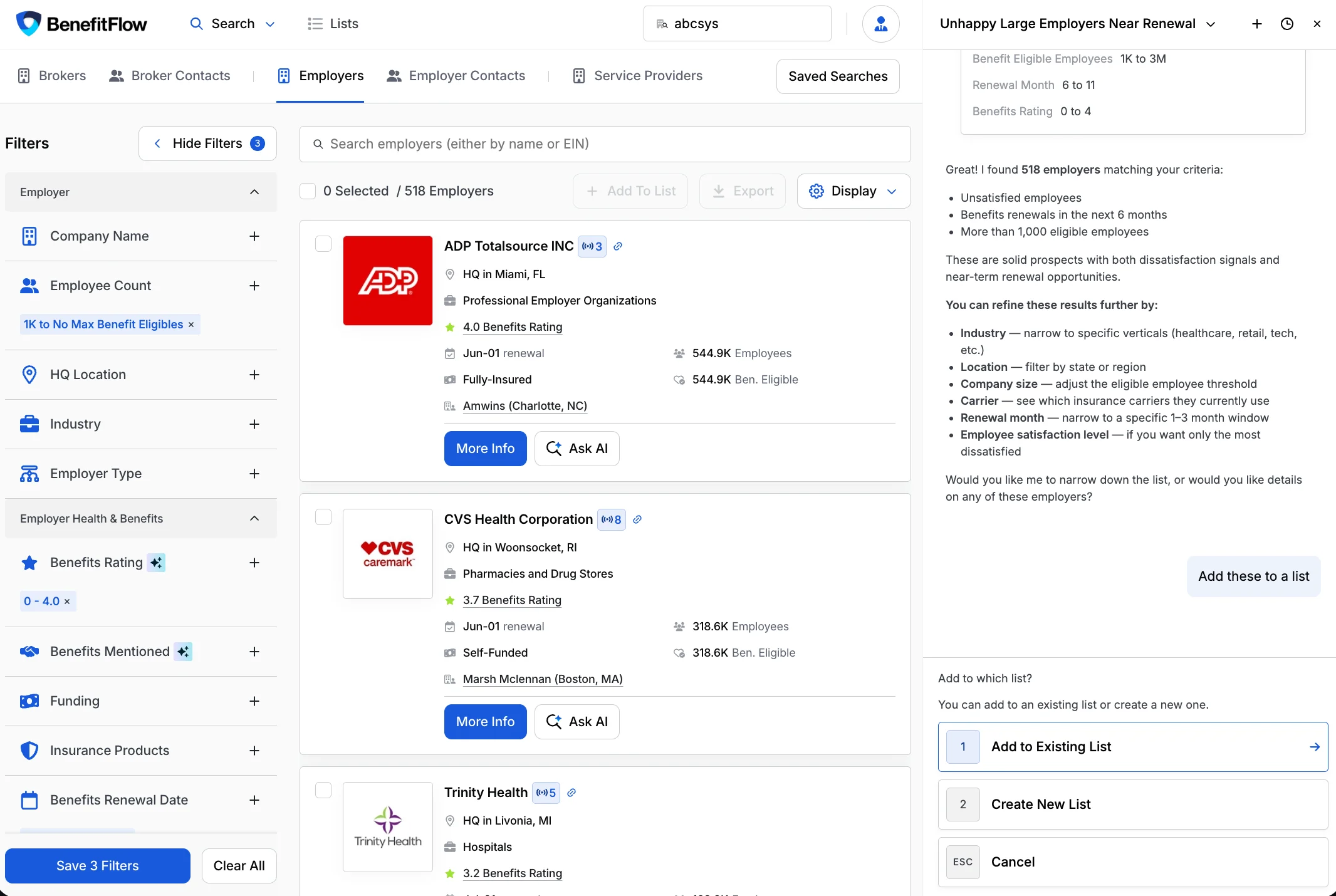
FlowPilot — BenefitFlow's AI sales assistant — is now generally available to all customers. Describe what you're looking for in plain language, and FlowPilot builds lists, researches accounts, and drafts outreach in minutes.
 Highlights:
* **Build target lists conversationally** — describe your ideal accounts and FlowPilot builds the list, ready to save and work
* **Surface account intelligence** — get a research brief on any company right in the chat
* **Draft outreach** — identify the right decision-maker and generate a personalized first-touch email
* **Save results to a list** — just ask; FlowPilot adds results to a new or existing list
* **Chat sessions** — open a new chat tab and revisit past conversations anytime
* **Smarter search** — semantic search for industries and job titles, regional location search ("midwest", "tri-state"), and PEO filter support
What FlowPilot does, where to find it, and how to get the best results
### Sort your search results
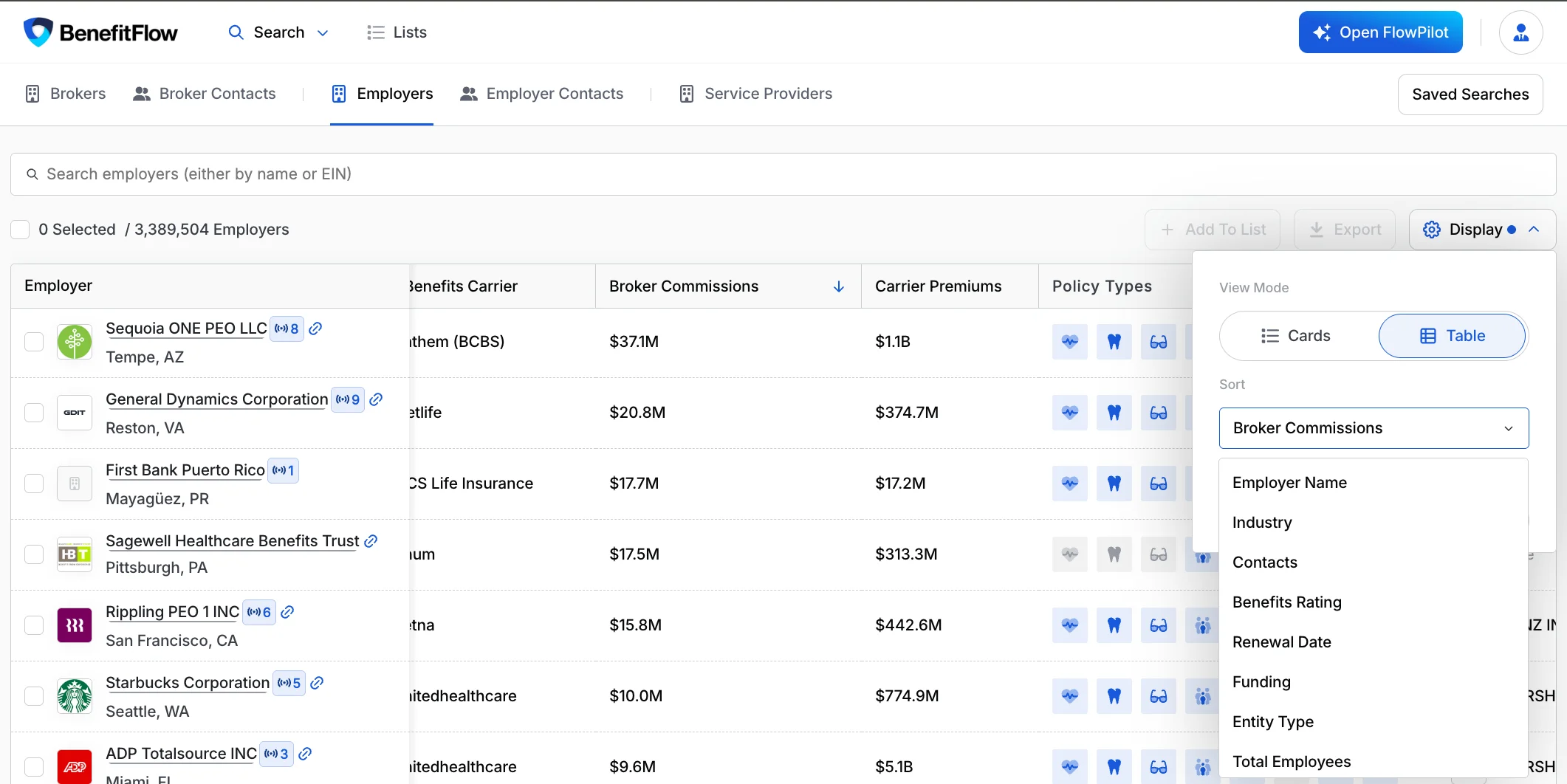
You can now sort search results by any column, ascending or descending — in both card and table views. Open **Display**, pick a sort field (Broker Commissions, Renewal Date, Benefits Rating, Total Employees, and more), and surface your best prospects first.
Highlights:
* **Build target lists conversationally** — describe your ideal accounts and FlowPilot builds the list, ready to save and work
* **Surface account intelligence** — get a research brief on any company right in the chat
* **Draft outreach** — identify the right decision-maker and generate a personalized first-touch email
* **Save results to a list** — just ask; FlowPilot adds results to a new or existing list
* **Chat sessions** — open a new chat tab and revisit past conversations anytime
* **Smarter search** — semantic search for industries and job titles, regional location search ("midwest", "tri-state"), and PEO filter support
What FlowPilot does, where to find it, and how to get the best results
### Sort your search results
You can now sort search results by any column, ascending or descending — in both card and table views. Open **Display**, pick a sort field (Broker Commissions, Renewal Date, Benefits Rating, Total Employees, and more), and surface your best prospects first.
 ### More on every contact export
Contact exports now include additional company fields, so you get richer context about each contact's employer without a separate lookup.
Exporting records and how credits work
### Thanks for reading!
We hope you're as excited as we are about these updates! If you have any questions, please don't hesitate to reach out.
\- The BenefitFlow Team
### More on every contact export
Contact exports now include additional company fields, so you get richer context about each contact's employer without a separate lookup.
Exporting records and how credits work
### Thanks for reading!
We hope you're as excited as we are about these updates! If you have any questions, please don't hesitate to reach out.
\- The BenefitFlow Team