> ## Documentation Index
> Fetch the complete documentation index at: https://docs.benefitflow.com/llms.txt
> Use this file to discover all available pages before exploring further.
# Using Signals
> Signals surfaces timely events on every employer and broker account — renewals, broker changes, compliance flags, and more — so you know when to reach out and why.
## What Is Signals?
Signals shows you the timely events happening on every employer and broker in BenefitFlow — things like upcoming renewals, broker or carrier switches, compliance flags, and key contact changes. Instead of manually checking each profile, you see the relevant moments grouped by category, right where you're already working.
## Where to Find Signals
Signals appear in three places across BenefitFlow:
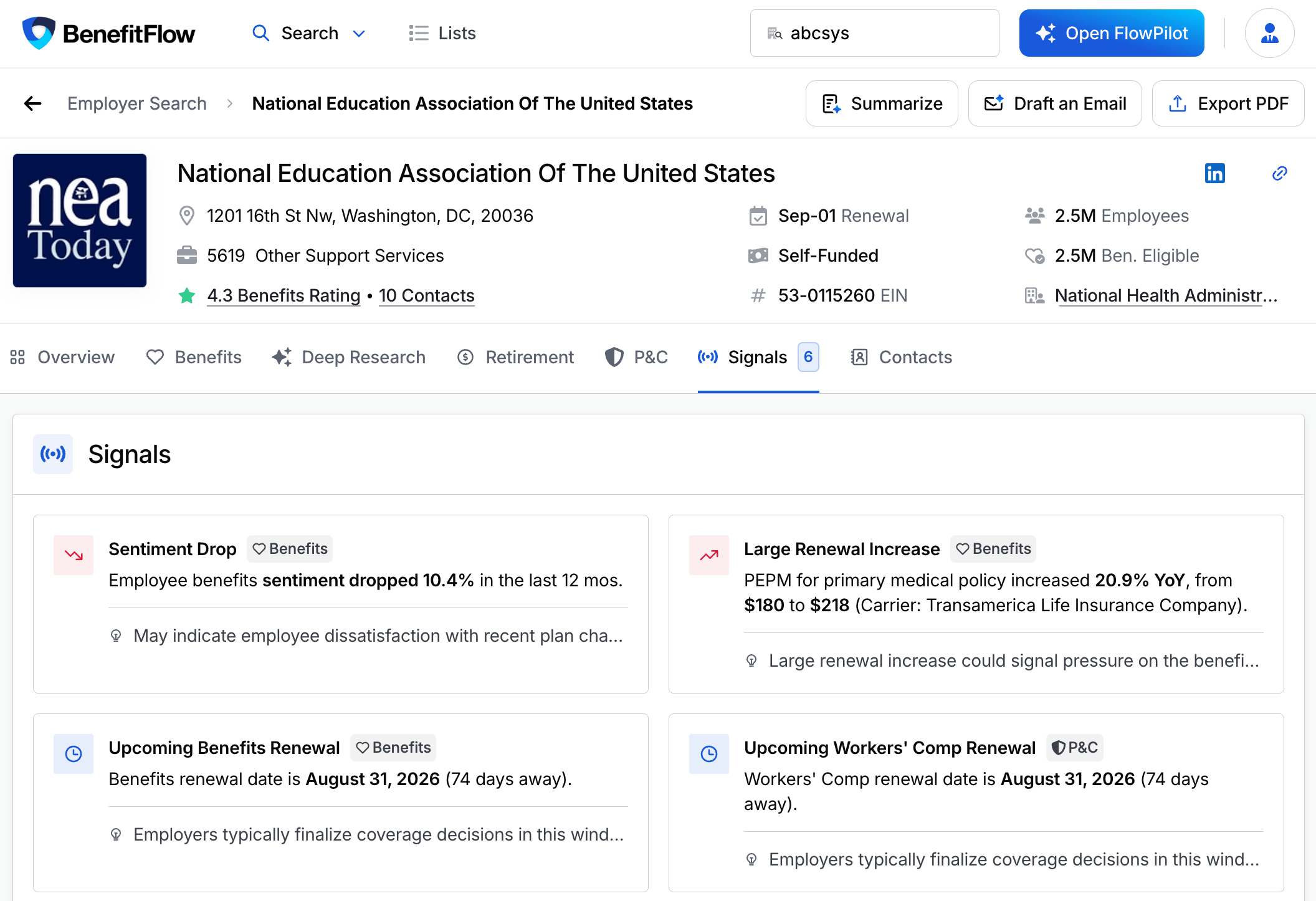
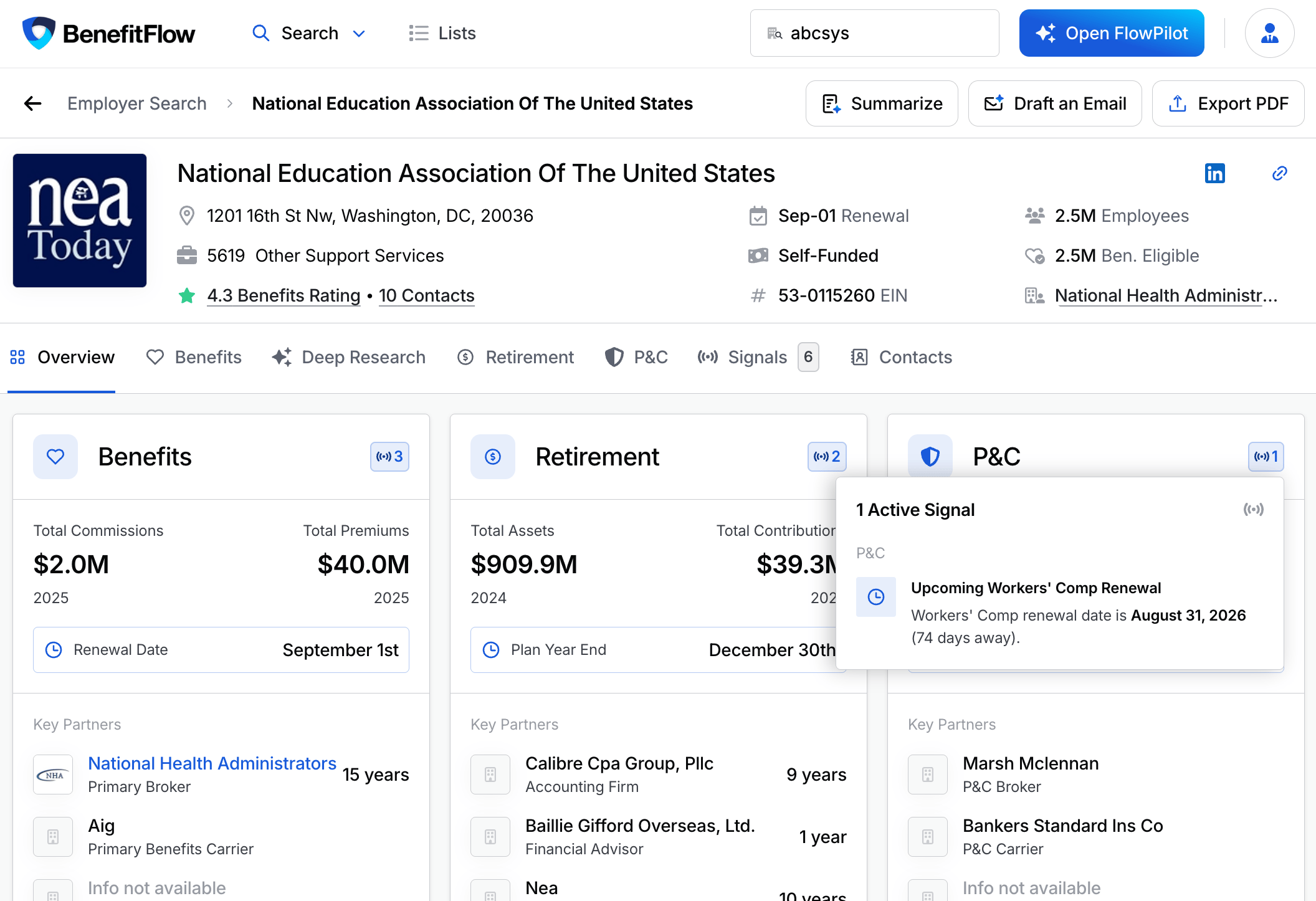
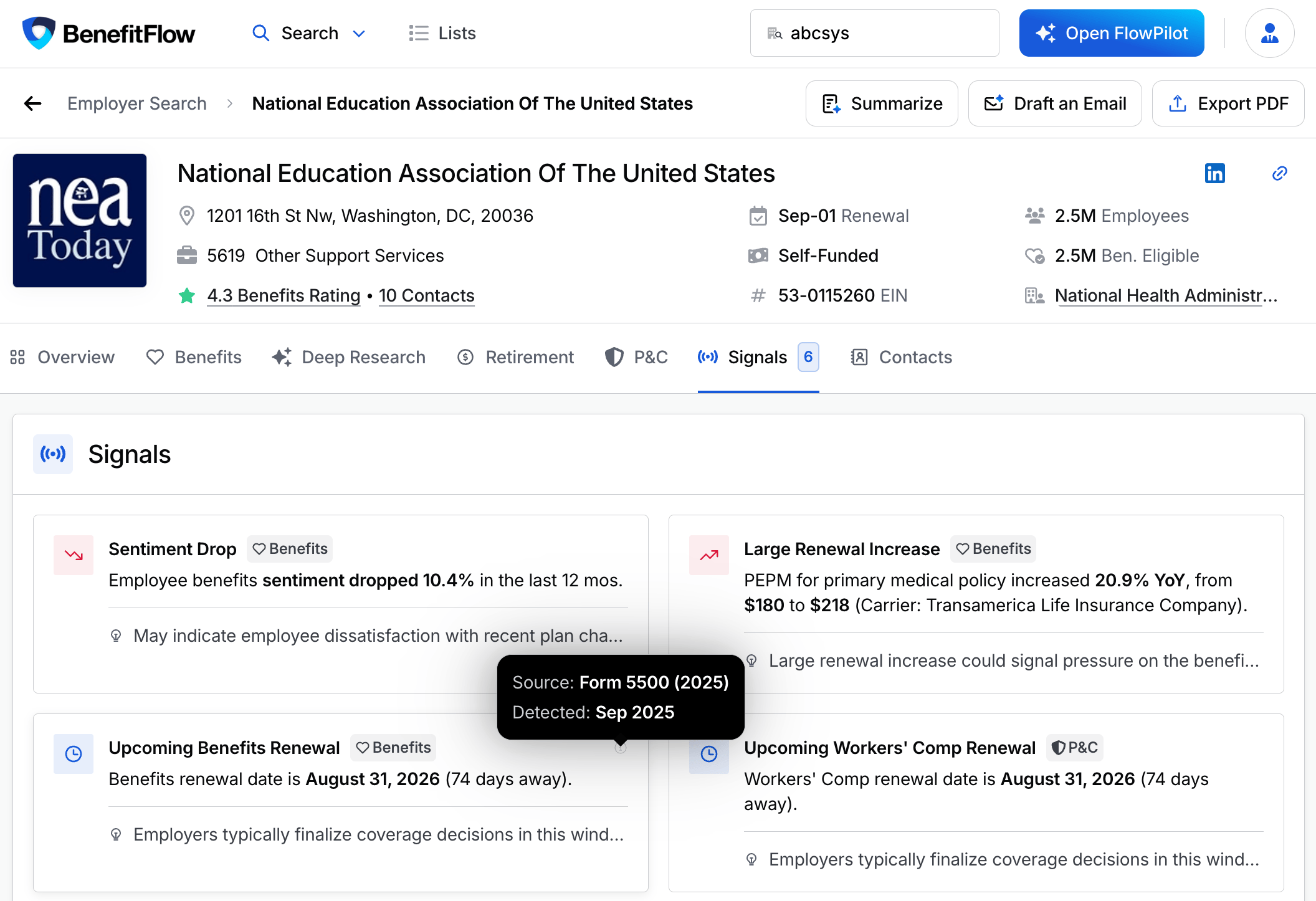
* **Employer profiles.** Open any employer to see all active signals on the Signals tab, or hover the domain cards on the Overview for a quick count by category.
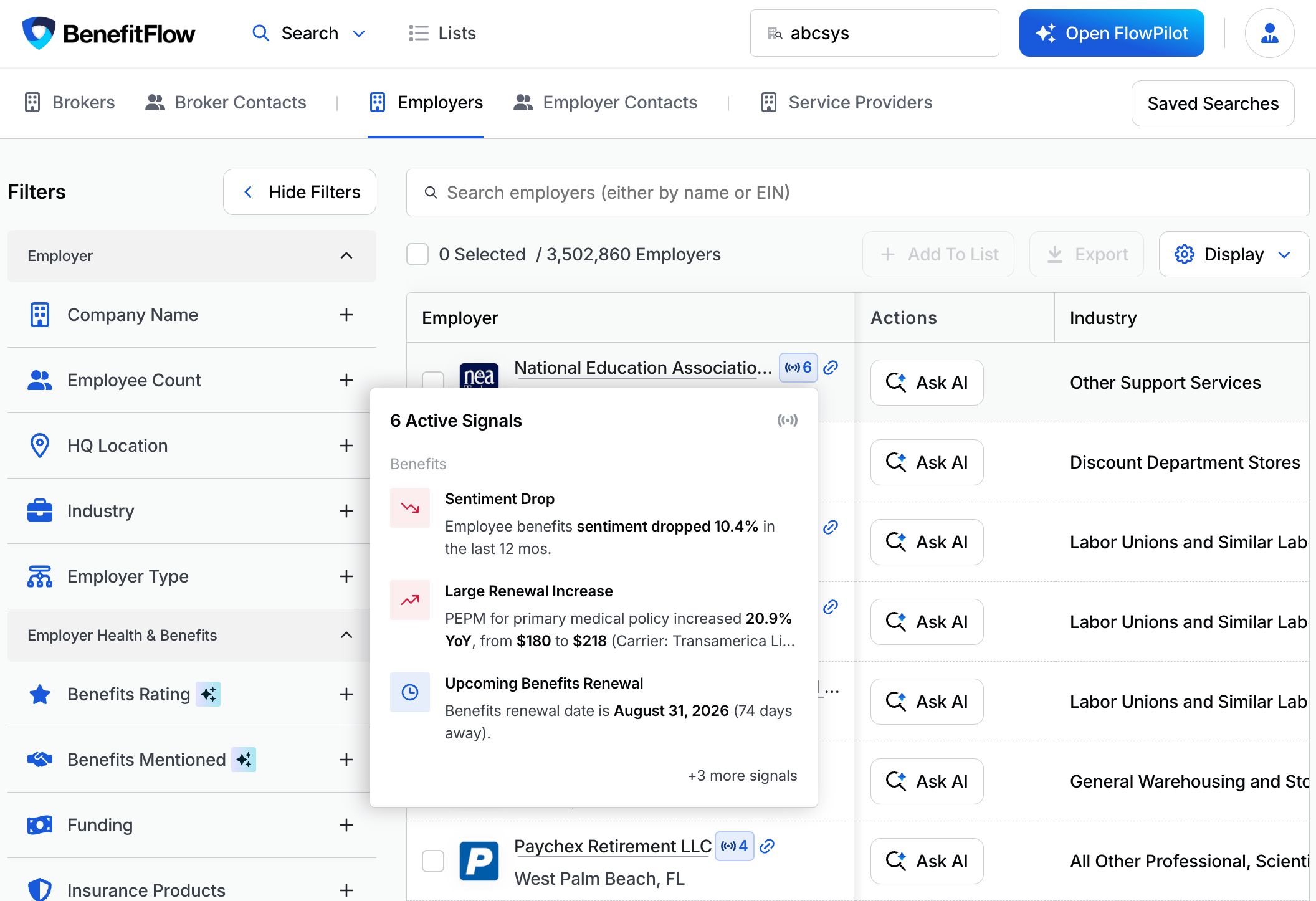
 * **Search results.** A signal badge appears on every result card — hover to preview what's active before clicking in. Works on Employer Search and any broker's or office's Clients list.
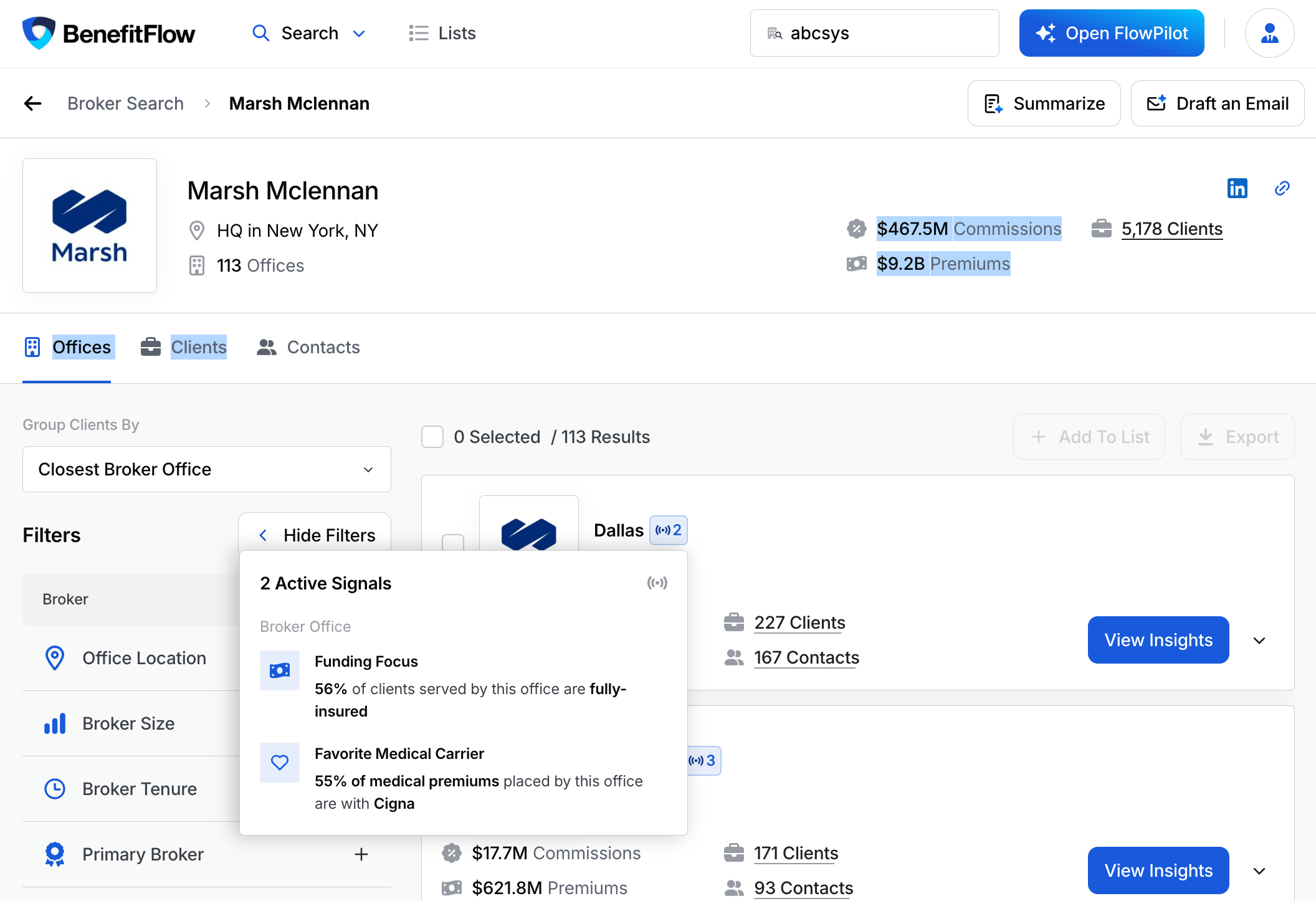
 * **Broker office pages.** Signals on an office reflect that office's own book — client composition, carrier concentration, and growth. There's no rolled-up parent broker view.
 No setup required. Signals is available to everyone.
## Signal Categories
Signals are grouped by category: Contacts, Benefits, P\&C, Retirement, and Broker. Within each category, the most recent signal appears first.
Each signal card is color-coded by tone:
* **Red** — a negative change (premium up, sentiment down, X-Mod increase)
* **Green** — a positive change (client growth, sentiment spike, rising contributions)
* **Amber** — a risk or compliance flag (OSHA, late filing, DOL action, high X-Mod)
* **Blue / Neutral** — a factual event or upcoming date (carrier or broker switch, renewal coming)
### Benefits
| Signal | What it means |
| :-------------------------------- | :----------------------------------------------------------------------- |
| Upcoming Benefits Renewal | Renewal date is within 90 days — the typical decision window. |
| Carrier Change | Primary carrier switched in the most recent filing cycle. |
| Broker Change | Primary broker changed. |
| Large Renewal Increase / Decrease | Health insurance cost per employee changed significantly year-over-year. |
| Sentiment Spike / Drop | Employee benefits sentiment shifted meaningfully in the last 12 months. |
| Plan Participation Change | Health plan enrollment rose or fell significantly year-over-year. |
| Benefits Change Detected | Multiple benefit changes flagged in the most recent filing. |
### P\&C
| Signal | What it means |
| :----------------------------- | :------------------------------------------------------------ |
| Upcoming Workers' Comp Renewal | WC renewal is within 90 days. |
| High X-Mod | Workers' Comp modifier is significantly above industry peers. |
| X-Mod Increase | Workers' Comp costs may be rising for this account. |
| OSHA Trends | Repeated OSHA violations across multiple years. |
| DOT Safety Flag | Poor DOT safety metrics or recent incidents flagged. |
| Significant Loss Event | A major workplace injury or loss event on record. |
| Workers' Comp Carrier Change | The employer's WC carrier switched. |
| Workers' Comp Broker Change | The broker on the WC policy changed. |
### Retirement
| Signal | What it means |
| :----------------------------- | :---------------------------------------------------------------------------------------------------- |
| Compliance Flags | Covers insufficient fidelity bonds, corrective distributions, late contributions, and audit findings. |
| YoY Asset / Participant Change | Plan assets or participant count changed significantly year-over-year. |
| Employer Contribution Trend | Employer contributions per participant shifted significantly. |
| Recordkeeper Change | Recordkeeper switched (e.g., Fidelity to Empower). |
### Contacts
| Signal | What it means |
| :------------------------------ | :----------------------------------------------------------- |
| New Decision Maker / Job Change | A key contact recently joined the employer or changed roles. |
### Broker Office
These signals appear on broker office pages and reflect that office's book of business.
| Signal | What it means |
| :----------------------------------- | :---------------------------------------------------------- |
| Significant Client Growth / Losses | Client count changed significantly year-over-year. |
| Industry Focus | A majority of clients are concentrated in one industry. |
| Company Size Focus | Book is concentrated in a particular employer size segment. |
| Funding Focus | Most clients are fully-insured or self-funded. |
| Favorite Medical / Ancillary Carrier | Majority of premium placed with one carrier. |
### Compliance Events
These span both Benefits and Retirement.
| Signal | What it means |
| :--------------------- | :------------------------------------------ |
| Late Filing | Form 5500 was filed significantly late. |
| DOL Enforcement Action | Active DOL enforcement action recorded. |
| DOL Investigation | Active DOL investigation flagged. |
| Filing Anomalies | Anomalies flagged in the regulatory record. |
## How to Read a Signal Card
No setup required. Signals is available to everyone.
## Signal Categories
Signals are grouped by category: Contacts, Benefits, P\&C, Retirement, and Broker. Within each category, the most recent signal appears first.
Each signal card is color-coded by tone:
* **Red** — a negative change (premium up, sentiment down, X-Mod increase)
* **Green** — a positive change (client growth, sentiment spike, rising contributions)
* **Amber** — a risk or compliance flag (OSHA, late filing, DOL action, high X-Mod)
* **Blue / Neutral** — a factual event or upcoming date (carrier or broker switch, renewal coming)
### Benefits
| Signal | What it means |
| :-------------------------------- | :----------------------------------------------------------------------- |
| Upcoming Benefits Renewal | Renewal date is within 90 days — the typical decision window. |
| Carrier Change | Primary carrier switched in the most recent filing cycle. |
| Broker Change | Primary broker changed. |
| Large Renewal Increase / Decrease | Health insurance cost per employee changed significantly year-over-year. |
| Sentiment Spike / Drop | Employee benefits sentiment shifted meaningfully in the last 12 months. |
| Plan Participation Change | Health plan enrollment rose or fell significantly year-over-year. |
| Benefits Change Detected | Multiple benefit changes flagged in the most recent filing. |
### P\&C
| Signal | What it means |
| :----------------------------- | :------------------------------------------------------------ |
| Upcoming Workers' Comp Renewal | WC renewal is within 90 days. |
| High X-Mod | Workers' Comp modifier is significantly above industry peers. |
| X-Mod Increase | Workers' Comp costs may be rising for this account. |
| OSHA Trends | Repeated OSHA violations across multiple years. |
| DOT Safety Flag | Poor DOT safety metrics or recent incidents flagged. |
| Significant Loss Event | A major workplace injury or loss event on record. |
| Workers' Comp Carrier Change | The employer's WC carrier switched. |
| Workers' Comp Broker Change | The broker on the WC policy changed. |
### Retirement
| Signal | What it means |
| :----------------------------- | :---------------------------------------------------------------------------------------------------- |
| Compliance Flags | Covers insufficient fidelity bonds, corrective distributions, late contributions, and audit findings. |
| YoY Asset / Participant Change | Plan assets or participant count changed significantly year-over-year. |
| Employer Contribution Trend | Employer contributions per participant shifted significantly. |
| Recordkeeper Change | Recordkeeper switched (e.g., Fidelity to Empower). |
### Contacts
| Signal | What it means |
| :------------------------------ | :----------------------------------------------------------- |
| New Decision Maker / Job Change | A key contact recently joined the employer or changed roles. |
### Broker Office
These signals appear on broker office pages and reflect that office's book of business.
| Signal | What it means |
| :----------------------------------- | :---------------------------------------------------------- |
| Significant Client Growth / Losses | Client count changed significantly year-over-year. |
| Industry Focus | A majority of clients are concentrated in one industry. |
| Company Size Focus | Book is concentrated in a particular employer size segment. |
| Funding Focus | Most clients are fully-insured or self-funded. |
| Favorite Medical / Ancillary Carrier | Majority of premium placed with one carrier. |
### Compliance Events
These span both Benefits and Retirement.
| Signal | What it means |
| :--------------------- | :------------------------------------------ |
| Late Filing | Form 5500 was filed significantly late. |
| DOL Enforcement Action | Active DOL enforcement action recorded. |
| DOL Investigation | Active DOL investigation flagged. |
| Filing Anomalies | Anomalies flagged in the regulatory record. |
## How to Read a Signal Card
 Each signal card shows:
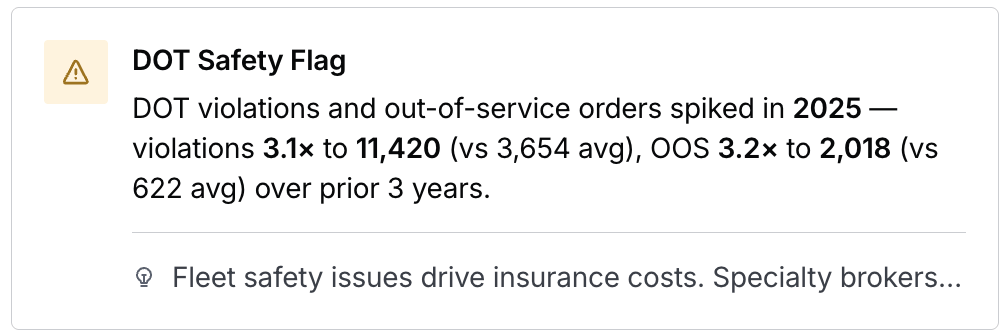
* **An icon, color-coded by tone.** Red, green, amber, or neutral. The icon shape echoes the event — an arrow for a trend, a clock for a renewal, a warning for a risk.
* **A headline and detail.** The event in plain language, with real names and numbers (e.g., "PEPM for primary medical policy increased 20.9% YoY, from $180 to $218 — Carrier: Transamerica").
* **A category tag.** Benefits, P\&C, Retirement, Contacts, or Broker.
* **A brief note on what the signal means for this account.**
* **A source, on hover.** The underlying record and when BenefitFlow detected it — for example, "Source: Form 5500 (2025) · Detected: Sep 2025."
Each signal card shows:
* **An icon, color-coded by tone.** Red, green, amber, or neutral. The icon shape echoes the event — an arrow for a trend, a clock for a renewal, a warning for a risk.
* **A headline and detail.** The event in plain language, with real names and numbers (e.g., "PEPM for primary medical policy increased 20.9% YoY, from $180 to $218 — Carrier: Transamerica").
* **A category tag.** Benefits, P\&C, Retirement, Contacts, or Broker.
* **A brief note on what the signal means for this account.**
* **A source, on hover.** The underlying record and when BenefitFlow detected it — for example, "Source: Form 5500 (2025) · Detected: Sep 2025."
 ## Common Ways to Use Signals
**Act on upcoming renewals.** When you see a renewal signal, that employer's benefits renewal is within 90 days — the typical decision window. It's the right time to reach out before coverage decisions are finalized.
**Follow relationship changes.** A broker or carrier switch signals recent change — the employer may still be evaluating options.
**Engage new decision-makers early.** A contact change signal flags when a key decision-maker is new to the role — typically a good window to introduce yourself.
**Lead with something specific.** Risk signals — a high X-Mod, a compliance flag, a sentiment drop — give you a concrete starting point for the conversation.
**Size up a broker office before you engage.** Broker office signals show the book's industry mix, funding preferences, and carrier relationships — so you know what you're walking into.
## Where the Data Comes From
Every signal traces back to a real record — no predictions or AI scores. Hover any signal card to see the source and detection date.
Sources include:
* Form 5500 filings (benefits and retirement signals)
* State workers' comp data (X-Mod and WC renewals)
* OSHA and DOT records (safety violations and loss events)
* DOL enforcement records (compliance and filing events)
* Employee review platforms (benefits sentiment)
* Contact data (job changes and new decision-makers)
Signals refresh daily to weekly, not in real time. Public records like Form 5500 file annually, so some signals reflect the most recent available filing rather than last week's activity. Signals age off automatically once an event is no longer timely.
## FAQs
Not necessarily. Smaller or private employers file less data, so they have fewer signals. An account can also go quiet between events. No signals means there's nothing timely to surface right now, not that data is missing.
A few things are on the way: filtering search results by signal type, and signals integration with FlowPilot. For now, signals are visible on employer profiles, search results, and broker office pages.
No. Signals is on for all BenefitFlow accounts automatically. There's no toggle, and nothing for a customer admin to enable.
Signals reflect the underlying source record, and public data can lag. A renewal date or carrier pulled from an older filing isn't necessarily wrong — it's the most recent data available. If a signal seems repeatedly or clearly incorrect, reach out to your Customer Success Manager or email [customerteam@benefit-flow.com](mailto:customerteam@benefit-flow.com).
## Common Ways to Use Signals
**Act on upcoming renewals.** When you see a renewal signal, that employer's benefits renewal is within 90 days — the typical decision window. It's the right time to reach out before coverage decisions are finalized.
**Follow relationship changes.** A broker or carrier switch signals recent change — the employer may still be evaluating options.
**Engage new decision-makers early.** A contact change signal flags when a key decision-maker is new to the role — typically a good window to introduce yourself.
**Lead with something specific.** Risk signals — a high X-Mod, a compliance flag, a sentiment drop — give you a concrete starting point for the conversation.
**Size up a broker office before you engage.** Broker office signals show the book's industry mix, funding preferences, and carrier relationships — so you know what you're walking into.
## Where the Data Comes From
Every signal traces back to a real record — no predictions or AI scores. Hover any signal card to see the source and detection date.
Sources include:
* Form 5500 filings (benefits and retirement signals)
* State workers' comp data (X-Mod and WC renewals)
* OSHA and DOT records (safety violations and loss events)
* DOL enforcement records (compliance and filing events)
* Employee review platforms (benefits sentiment)
* Contact data (job changes and new decision-makers)
Signals refresh daily to weekly, not in real time. Public records like Form 5500 file annually, so some signals reflect the most recent available filing rather than last week's activity. Signals age off automatically once an event is no longer timely.
## FAQs
Not necessarily. Smaller or private employers file less data, so they have fewer signals. An account can also go quiet between events. No signals means there's nothing timely to surface right now, not that data is missing.
A few things are on the way: filtering search results by signal type, and signals integration with FlowPilot. For now, signals are visible on employer profiles, search results, and broker office pages.
No. Signals is on for all BenefitFlow accounts automatically. There's no toggle, and nothing for a customer admin to enable.
Signals reflect the underlying source record, and public data can lag. A renewal date or carrier pulled from an older filing isn't necessarily wrong — it's the most recent data available. If a signal seems repeatedly or clearly incorrect, reach out to your Customer Success Manager or email [customerteam@benefit-flow.com](mailto:customerteam@benefit-flow.com).