

Getting there
- Search for a broker from the Broker tab
- On the broker’s profile, find the office you want under the Offices tab
- Click View Insights on any office row
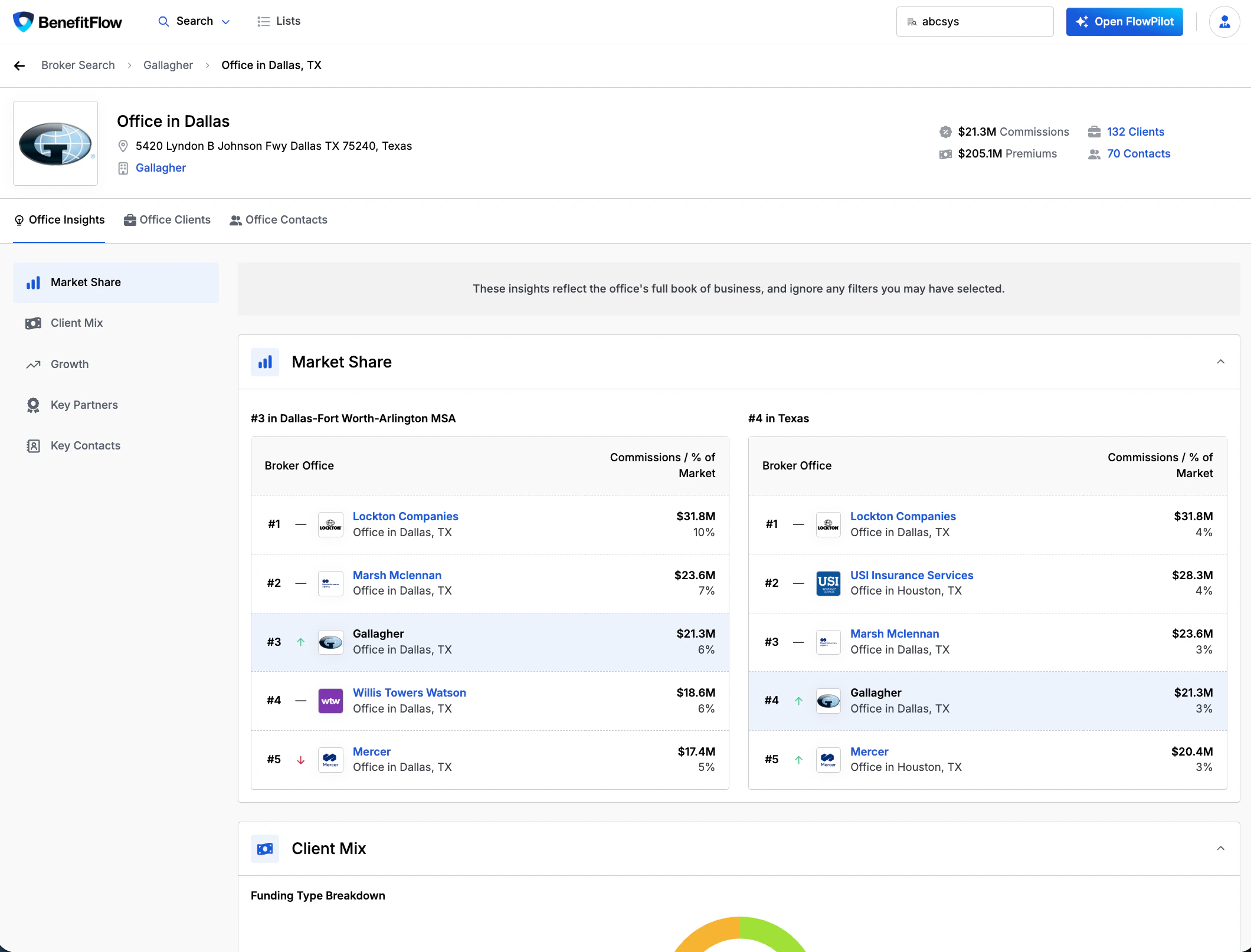
Market Share
See how this office ranks against competitors in its geography.- MSA ranking — position and market share by commissions in the office’s metro area
- State ranking — same view at the state level
- Each leaderboard shows the top broker offices with commissions and % of market
- The current office is highlighted so you can quickly see where they stand
Client Mix
Understand the composition of the office’s book of business.- Funding Type Breakdown — donut chart showing the split between self-funded and fully insured clients
- Employee Size Distribution — bar chart showing client count by employer size band (0–100, 101–200, 201–500, 501–1,000, 1,000+), color-coded by funding type
- Top Industries — bar chart showing the office’s top 5 industries by client count
Growth
Track how the office’s book has changed over time.- Client Count Trend — 5-year bar chart showing total client count per year
- Net New Clients — line chart showing net client adds over the past 12 months
- Client Retention Rate — 3-year average retention percentage
- The Clients list can be filtered by Primary Broker, Broker Tenure, and Broker Commissions
- Clients Won / Lost / Stopped Filing — stacked bar chart breaking down annual client movement:
- Clients Won (green) — new employer relationships added that year
- Lost Clients (red) — employers that moved to a different confirmed broker
- Stopped Filing (orange) — employers that stopped filing Form 5500 entirely (no confirmed new broker)
Stopped Filing ≠ Lost. “Stopped Filing” means the employer no longer appears in Form 5500 data — they may have dropped coverage, gone below the filing threshold, or switched to a broker we can’t yet identify. These are separated from confirmed losses to avoid unfairly skewing retention metrics.
Key Partners
See the carriers and vendors this office works with most.- Top Medical Carriers — table showing carrier name, top product, covered lives, client count, and premiums with % of total
- Top Ancillary Carriers — same format for dental, vision, life, disability, and other lines
- Top Vendors — vendor name, category, and client count
Key Contacts
Browse the producers and account managers at this office.- Contact cards showing name, title, location, and tenure
- Verified Producer badges for contacts with confirmed licensing
- Unlock Contact to reveal email and phone using contact credits
Office Clients
See every employer a broker office serves, then narrow it to the ones you want to go after.How to find a broker office's clients
- On the office, click the Clients count or the Office Clients tab
- Filter by Employee Count, Benefits Renewal Date, Industry, Funding, and more. The client count updates as you filter.
- Select the employers you want and click Add To List to save them as a prospecting list
Related
Employer Profiles
Detailed employer views — benefits, history, deep research
Form 5500 Overview
How Form 5500 data powers BenefitFlow
What is the Primary Broker?
How BenefitFlow determines the primary broker relationship
Build Marketing Lists
Create targeted outreach lists from search results