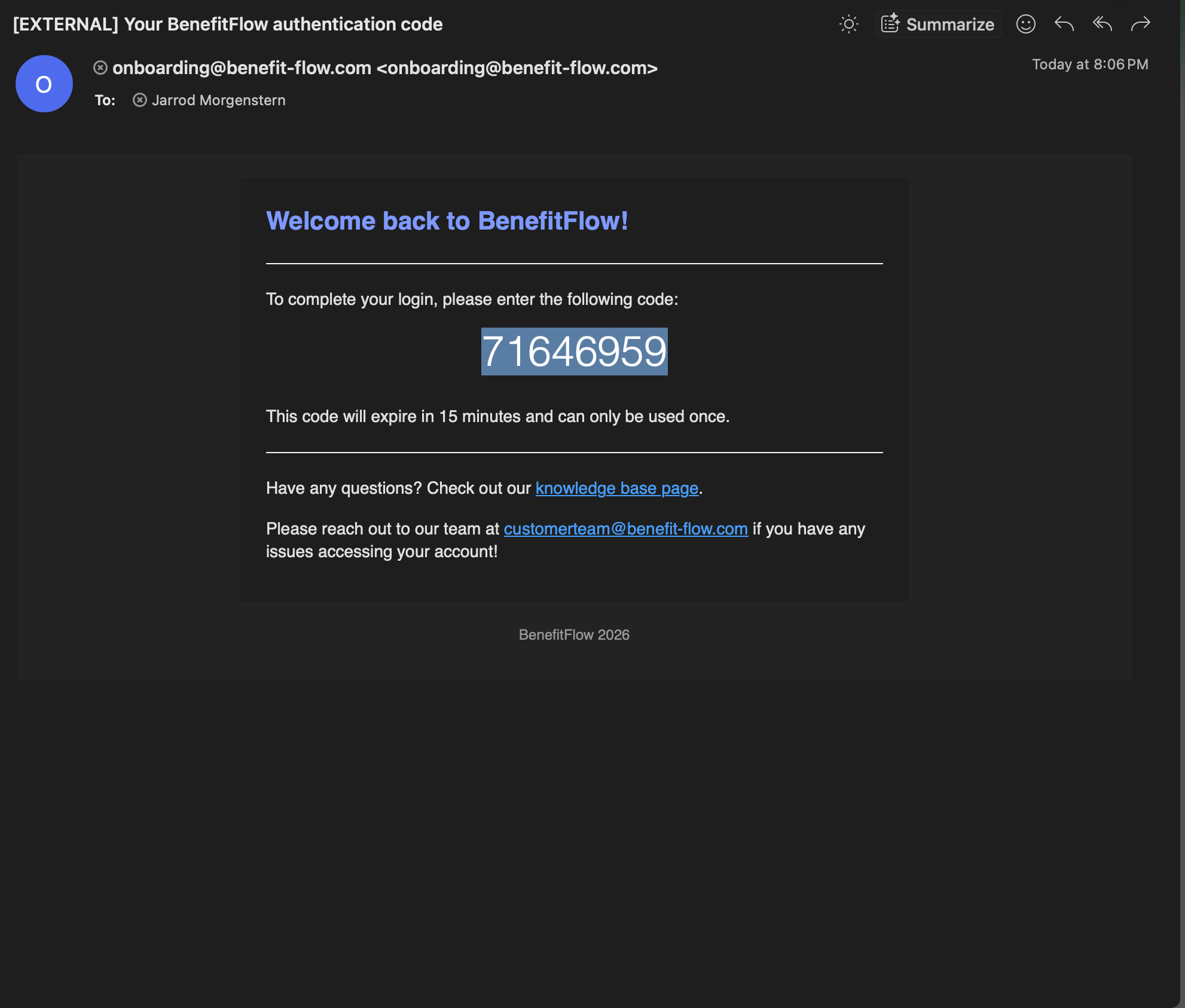
Check your inbox for a code from onboarding@benefit-flow.com (subject “Your BenefitFlow authentication code”). It’s good for 15 minutes and works once.
4
Enter the code and you’re in.
Don’t see the code? Check your spam or junk folder, and ask your IT team to allow email from benefit-flow.com. More fixes in Login troubleshooting.
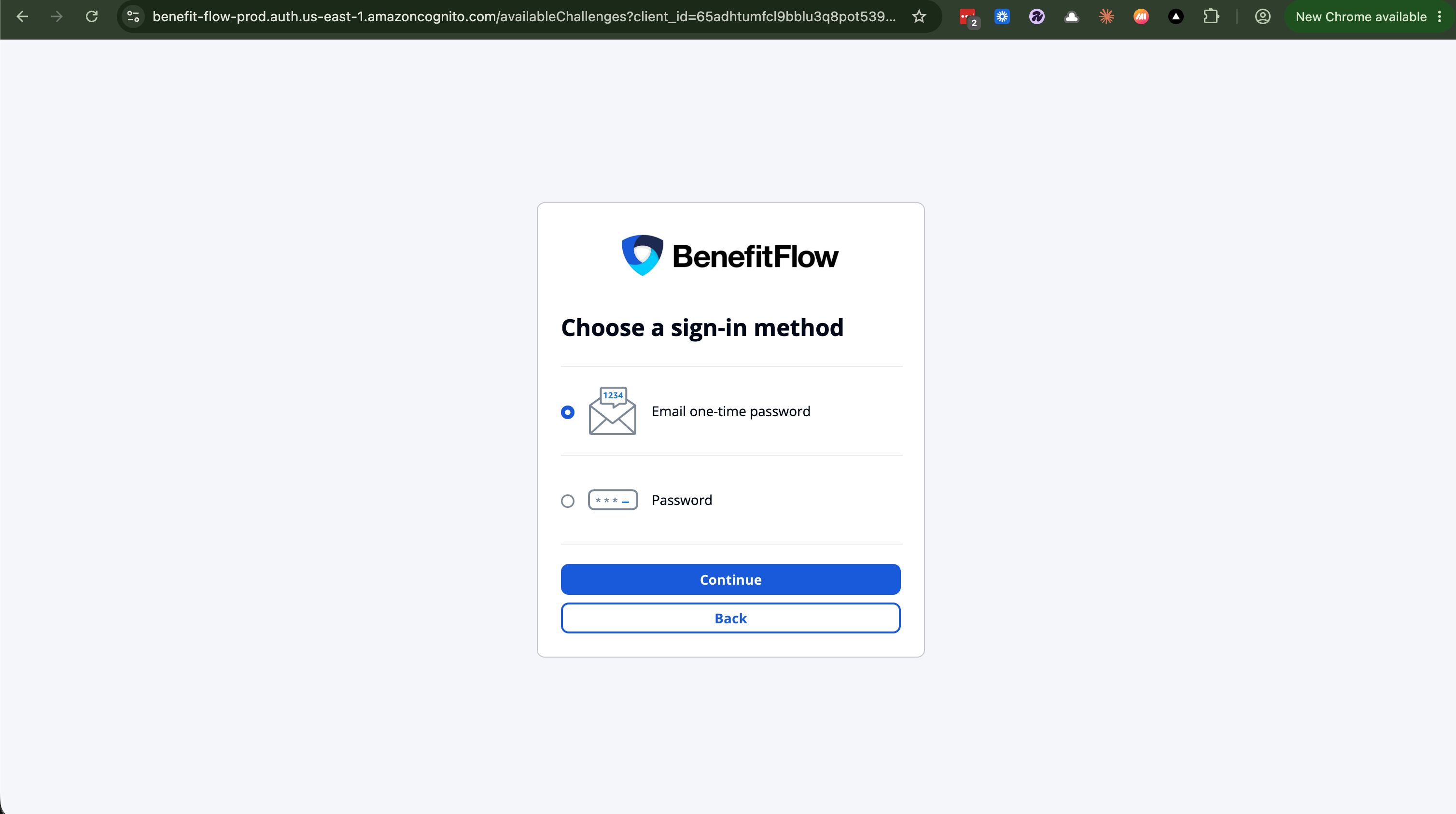
You can still use one. On the sign-in screen, choose Try another way, then Password. If you’ve never set a password, the one-time code above is the fastest way in.
There’s nothing to reset. Sign in with a one-time code using the steps above, that’s the way back in for everyone. Team admins can’t reset passwords on your behalf.Still stuck? Email customerteam@benefit-flow.com and we’ll get you in.
Last modified on July 24, 2026
{"docsConfig":{"theme":"aspen","$schema":"https://mintlify.com/docs.json","name":"BenefitFlow Docs","colors":{"primary":"#1f5adc","light":"#185adb","dark":"#1f5adc"},"logo":{"light":"https://mintcdn.com/benefitflow/3AlZFAaq1xh6BhV6/logo/light.png?fit=max\u0026auto=format\u0026n=3AlZFAaq1xh6BhV6\u0026q=85\u0026s=1309c255c1daede71c6af9b9e74511cd","dark":"https://mintcdn.com/benefitflow/3AlZFAaq1xh6BhV6/logo/dark.png?fit=max\u0026auto=format\u0026n=3AlZFAaq1xh6BhV6\u0026q=85\u0026s=0194056f7975118c500f02c77b7bf71e","href":"https://www.benefitflow.com/"},"favicon":"https://mintcdn.com/benefitflow/Tcouuth1jKoeq3a0/favicon.png?fit=max\u0026auto=format\u0026n=Tcouuth1jKoeq3a0\u0026q=85\u0026s=93dd061a07e47d472143c24efa239001","appearance":{"default":"light","strict":true},"background":{"decoration":"grid"},"navbar":{"links":[{"href":"https://benefit-flow.com/login","label":"Login"}],"primary":{"type":"button","label":"Book a demo","href":"https://www.benefitflow.com/demo"}},"footer":{"socials":{"linkedin":"https://www.linkedin.com/company/benefitflow"}},"metadata":{"timestamp":true},"styling":{"latex":true},"navigation":{"pages":[]}},"deployment":{"deploymentMetadataValue":{"subdomain":"benefitflow","hasAudioNarration":false,"actualSubdomain":"benefitflow","customDomains":["docs.benefitflow.com"],"gitSource":{"type":"github","owner":"benefitflow","repo":"benefitflow.knowledge","deployBranch":"main","contentDirectory":"","isPrivate":true,"mountPath":"","label":""},"chroma":{"liveDeploymentHistoryId":"6ada29d98f23b9083222e542","collectionId":"8b49c84c-5b44-4f09-a5f8-a87f8a9bf6a9","schemaVersion":"v3","latestBuiltDeploymentHistoryId":"6ada29d98f23b9083222e542"},"entitlements":{"AI_CHAT":{"status":"ENABLED"},"WEB_MCP":{"status":"ENABLED"},"NARRATION":{"status":"ENABLED"}},"buildId":"6ada29d98f23b9083222e542","clientVersion":"0.0.3966","searchFilterCounts":[{"language":"default","tag":"Integrations","count":20},{"language":"default","tag":"Data FAQs","count":16},{"language":"default","tag":"Advanced Concepts","count":15},{"language":"default","tag":"General Data Questions","count":15},{"language":"default","tag":"Account \u0026 Billing","count":12},{"language":"default","tag":"Release Notes \u0026 Product Updates","count":10},{"language":"default","tag":"Getting Started","count":10},{"language":"default","tag":"FAQ/Troubleshooting","count":7},{"language":"default","tag":"Security \u0026 Privacy","count":6},{"language":"default","tag":"The Basics","count":6}]},"assistantConfig":{"enableAskAiButton":false,"enableStarterQuestions":false,"enableAskAiSearchBar":true},"hasChatPermissions":true,"hasWebMcpPermissions":true,"toggles":[{"name":"kill-isr","enabled":true,"variant":{"name":"disabled","enabled":false,"feature_enabled":true},"impressionData":false},{"name":"agent-mintlify-slack","enabled":true,"variant":{"name":"disabled","enabled":false,"feature_enabled":true},"impressionData":false},{"name":"editor-v7-file-tree","enabled":true,"variant":{"name":"disabled","enabled":false,"feature_enabled":true},"impressionData":false},{"name":"agent-integrations-settings","enabled":true,"variant":{"name":"disabled","enabled":false,"feature_enabled":true},"impressionData":false},{"name":"automations-pr-grouping","enabled":true,"variant":{"name":"disabled","enabled":false,"feature_enabled":true},"impressionData":false},{"name":"custom-prefix","enabled":true,"variant":{"name":"disabled","enabled":false,"feature_enabled":true},"impressionData":false},{"name":"analytics-v7","enabled":true,"variant":{"name":"disabled","enabled":false,"feature_enabled":true},"impressionData":false},{"name":"user-flows-analytics","enabled":true,"variant":{"name":"disabled","enabled":false,"feature_enabled":true},"impressionData":false},{"name":"no-publish-flow","enabled":true,"variant":{"name":"disabled","enabled":false,"feature_enabled":true},"impressionData":false},{"name":"workos-onboarding","enabled":true,"variant":{"name":"disabled","enabled":false,"feature_enabled":true},"impressionData":false},{"name":"llms-txt-v2","enabled":true,"variant":{"name":"disabled","enabled":false,"feature_enabled":true},"impressionData":false},{"name":"pause-universal-search-reconcile","enabled":true,"variant":{"name":"disabled","enabled":false,"feature_enabled":true},"impressionData":false},{"name":"snapshot-serving-live","enabled":true,"variant":{"name":"disabled","enabled":false,"feature_enabled":true},"impressionData":false},{"name":"stripTemperatureMiddleware","enabled":true,"variant":{"name":"disabled","enabled":false,"feature_enabled":true},"impressionData":false},{"name":"per-site-search-delta","enabled":true,"variant":{"name":"disabled","enabled":false,"feature_enabled":true},"impressionData":false},{"name":"support-platform-pylon-zendesk","enabled":true,"variant":{"name":"disabled","enabled":false,"feature_enabled":true},"impressionData":false},{"name":"snapshot-serving","enabled":true,"variant":{"name":"disabled","enabled":false,"feature_enabled":true},"impressionData":false},{"name":"instant-rollback","enabled":true,"variant":{"name":"disabled","enabled":false,"feature_enabled":true},"impressionData":false},{"name":"granular-notifications-server","enabled":true,"variant":{"name":"disabled","enabled":false,"feature_enabled":true},"impressionData":false},{"name":"granular-notifications","enabled":true,"variant":{"name":"disabled","enabled":false,"feature_enabled":true},"impressionData":false},{"name":"editor-private-page-search","enabled":true,"variant":{"name":"disabled","enabled":false,"feature_enabled":true},"impressionData":false},{"name":"automations-fable","enabled":true,"variant":{"name":"disabled","enabled":false,"feature_enabled":true},"impressionData":false},{"name":"fixed-ai-action-pricing","enabled":true,"variant":{"name":"disabled","enabled":false,"feature_enabled":true},"impressionData":false},{"name":"automation-resolve-merge-conflict","enabled":true,"variant":{"name":"disabled","enabled":false,"feature_enabled":true},"impressionData":false},{"name":"scoped-publishing","enabled":true,"variant":{"name":"disabled","enabled":false,"feature_enabled":true},"impressionData":false},{"name":"mintql","enabled":true,"variant":{"name":"disabled","enabled":false,"feature_enabled":true},"impressionData":false},{"name":"page-level-analytics","enabled":true,"variant":{"name":"disabled","enabled":false,"feature_enabled":true},"impressionData":false},{"name":"editor-version-history-v2","enabled":true,"variant":{"name":"disabled","enabled":false,"feature_enabled":true},"impressionData":false},{"name":"editor-nav-generations","enabled":true,"variant":{"name":"disabled","enabled":false,"feature_enabled":true},"impressionData":false},{"name":"billing-page-v2","enabled":true,"variant":{"name":"disabled","enabled":false,"feature_enabled":true},"impressionData":false},{"name":"workspace-projects","enabled":true,"variant":{"name":"disabled","enabled":false,"feature_enabled":true},"impressionData":false},{"name":"assistant-v5","enabled":true,"variant":{"name":"disabled","enabled":false,"feature_enabled":true},"impressionData":false},{"name":"byok-sep-25","enabled":true,"variant":{"name":"disabled","enabled":false,"feature_enabled":true},"impressionData":false},{"name":"fork-pr-previews","enabled":true,"variant":{"name":"disabled","enabled":false,"feature_enabled":true},"impressionData":false},{"name":"revalidation-jwt","enabled":true,"variant":{"name":"disabled","enabled":false,"feature_enabled":true},"impressionData":false},{"name":"vite-origin","enabled":true,"variant":{"name":"disabled","enabled":false,"feature_enabled":true},"impressionData":false},{"name":"editor-agent-model-picker","enabled":true,"variant":{"name":"disabled","enabled":false,"feature_enabled":true},"impressionData":false},{"name":"billing-updated-9-15","enabled":true,"variant":{"name":"disabled","enabled":false,"feature_enabled":true},"impressionData":false},{"name":"hobby-abuse-scan","enabled":true,"variant":{"name":"disabled","enabled":false,"feature_enabled":true},"impressionData":false},{"name":"dashboard-inbox","enabled":true,"variant":{"name":"disabled","enabled":false,"feature_enabled":true},"impressionData":false}],"isAtlas":false,"googleFontsInlined":false},"customCss":[],"page":{"pagePath":"knowledge-base/signing-in","slug":"/knowledge-base/signing-in","pageMetadata":{"title":"Signing in to BenefitFlow","sidebarTitle":"Signing in","icon":"right-to-bracket","description":"How to sign in to BenefitFlow with a one-time email code. No password required.","href":"/knowledge-base/signing-in"},"description":{"compiledSource":"\"use strict\";\nconst {jsx: _jsx} = arguments[0];\nconst {useMDXComponents: _provideComponents} = arguments[0];\nfunction _createMdxContent(props) {\n const _components = {\n p: \"p\",\n ..._provideComponents(),\n ...props.components\n };\n return _jsx(_components.p, {\n children: \"How to sign in to BenefitFlow with a one-time email code. No password required.\"\n });\n}\nfunction MDXContent(props = {}) {\n const {wrapper: MDXLayout} = {\n ..._provideComponents(),\n ...props.components\n };\n return MDXLayout ? _jsx(MDXLayout, {\n ...props,\n children: _jsx(_createMdxContent, {\n ...props\n })\n }) : _createMdxContent(props);\n}\nreturn {\n default: MDXContent\n};\n","frontmatter":{},"scope":{}},"pageType":"default","mdx":{"mdxSource":{"compiledSource":"\"use strict\";const{Fragment:_Fragment,jsx:_jsx,jsxs:_jsxs}=arguments[0];const{useMDXComponents:_provideComponents}=arguments[0];function _createMdxContent(props){const _components={a:`a`,p:`p`,strong:`strong`,..._provideComponents(),...props.components},{Frame,Heading,OptimizedImage,Step,Steps,Tip}=_components;if(!Frame)_missingMdxReference(`Frame`,true);if(!Heading)_missingMdxReference(`Heading`,true);if(!OptimizedImage)_missingMdxReference(`OptimizedImage`,true);if(!Step)_missingMdxReference(`Step`,true);if(!Steps)_missingMdxReference(`Steps`,true);if(!Tip)_missingMdxReference(`Tip`,true);return _jsxs(_Fragment,{children:[_jsx(_components.p,{children:`Signing in is passwordless. Enter your work email and we send you a one-time code. There’s no password to remember or reset.`}),`\n`,_jsx(Heading,{level:`2`,id:`sign-in-with-a-one-time-code`,children:`Sign in with a one-time code`}),`\n`,_jsxs(Steps,{children:[_jsx(Step,{children:_jsxs(_components.p,{children:[`Go to `,_jsx(_components.a,{href:`https://www.benefitflow.com/login`,children:`www.benefitflow.com/login`}),`.`]})}),_jsx(Step,{children:_jsx(_components.p,{children:`Enter your work email.`})}),_jsx(Step,{children:_jsxs(_components.p,{children:[`Check your inbox for a code from `,_jsx(_components.a,{href:`mailto:onboarding@benefit-flow.com`,children:`onboarding@benefit-flow.com`}),` (subject “Your BenefitFlow authentication code”). It’s good for 15 minutes and works once.`]})}),_jsx(Step,{children:_jsx(_components.p,{children:`Enter the code and you’re in.`})})]}),`\n`,_jsx(Frame,{children:_jsx(OptimizedImage,{src:`https://mintcdn.com/benefitflow/OxytPafw3hIXZLWj/images/choose-sign-in-method.png?fit=max\u0026auto=format\u0026n=OxytPafw3hIXZLWj\u0026q=85\u0026s=c9145e84cca32f8954f6ee5f310536f5`,alt:`Choose a sign-in method screen with Email one-time password selected`,\"data-og-width\":`3016`,width:`3016`,\"data-og-height\":`1686`,height:`1686`,\"data-path\":`images/choose-sign-in-method.png`,\"data-optimize\":`true`,\"data-opv\":`3`,srcset:`https://mintcdn.com/benefitflow/OxytPafw3hIXZLWj/images/choose-sign-in-method.png?w=280\u0026fit=max\u0026auto=format\u0026n=OxytPafw3hIXZLWj\u0026q=85\u0026s=52accc621fc4a0b0af17a94d039b09cc 280w, https://mintcdn.com/benefitflow/OxytPafw3hIXZLWj/images/choose-sign-in-method.png?w=560\u0026fit=max\u0026auto=format\u0026n=OxytPafw3hIXZLWj\u0026q=85\u0026s=921a2ebfdce45cae6bf1a063a7fb61fd 560w, https://mintcdn.com/benefitflow/OxytPafw3hIXZLWj/images/choose-sign-in-method.png?w=840\u0026fit=max\u0026auto=format\u0026n=OxytPafw3hIXZLWj\u0026q=85\u0026s=4c210e2f6588e3320b15bac502118416 840w, https://mintcdn.com/benefitflow/OxytPafw3hIXZLWj/images/choose-sign-in-method.png?w=1100\u0026fit=max\u0026auto=format\u0026n=OxytPafw3hIXZLWj\u0026q=85\u0026s=597ca784143faaa1d6ac15a0d54b5577 1100w, https://mintcdn.com/benefitflow/OxytPafw3hIXZLWj/images/choose-sign-in-method.png?w=1650\u0026fit=max\u0026auto=format\u0026n=OxytPafw3hIXZLWj\u0026q=85\u0026s=3dbee267dfaccdaa5788a7928a57f371 1650w, https://mintcdn.com/benefitflow/OxytPafw3hIXZLWj/images/choose-sign-in-method.png?w=2500\u0026fit=max\u0026auto=format\u0026n=OxytPafw3hIXZLWj\u0026q=85\u0026s=4ddb17841342ac7eb52274683c98ee4d 2500w`})}),`\n`,_jsx(Frame,{children:_jsx(OptimizedImage,{src:`https://mintcdn.com/benefitflow/OxytPafw3hIXZLWj/images/sign-in-code-email.png?fit=max\u0026auto=format\u0026n=OxytPafw3hIXZLWj\u0026q=85\u0026s=19b54143180f3270d63a1cc06bd78f54`,alt:`The one-time sign-in code email from onboarding@benefit-flow.com`,\"data-og-width\":`1982`,width:`1982`,\"data-og-height\":`1686`,height:`1686`,\"data-path\":`images/sign-in-code-email.png`,\"data-optimize\":`true`,\"data-opv\":`3`,srcset:`https://mintcdn.com/benefitflow/OxytPafw3hIXZLWj/images/sign-in-code-email.png?w=280\u0026fit=max\u0026auto=format\u0026n=OxytPafw3hIXZLWj\u0026q=85\u0026s=6032cf12265dc2472a33d13c0b390916 280w, https://mintcdn.com/benefitflow/OxytPafw3hIXZLWj/images/sign-in-code-email.png?w=560\u0026fit=max\u0026auto=format\u0026n=OxytPafw3hIXZLWj\u0026q=85\u0026s=24ed3da3c83f72789008d7c21ef03646 560w, https://mintcdn.com/benefitflow/OxytPafw3hIXZLWj/images/sign-in-code-email.png?w=840\u0026fit=max\u0026auto=format\u0026n=OxytPafw3hIXZLWj\u0026q=85\u0026s=e96f43da966e7708f58fb9016740817b 840w, https://mintcdn.com/benefitflow/OxytPafw3hIXZLWj/images/sign-in-code-email.png?w=1100\u0026fit=max\u0026auto=format\u0026n=OxytPafw3hIXZLWj\u0026q=85\u0026s=df84bd24ab9ea69fffcf72d00da6aa58 1100w, https://mintcdn.com/benefitflow/OxytPafw3hIXZLWj/images/sign-in-code-email.png?w=1650\u0026fit=max\u0026auto=format\u0026n=OxytPafw3hIXZLWj\u0026q=85\u0026s=a23c2a4724cdbcbc33658d763bf02b34 1650w, https://mintcdn.com/benefitflow/OxytPafw3hIXZLWj/images/sign-in-code-email.png?w=2500\u0026fit=max\u0026auto=format\u0026n=OxytPafw3hIXZLWj\u0026q=85\u0026s=4bdb1bc1d0fdb6554feaca75d136218e 2500w`})}),`\n`,_jsx(Tip,{children:_jsxs(_components.p,{children:[`Don’t see the code? Check your spam or junk folder, and ask your IT team to allow email from benefit-flow.com. More fixes in `,_jsx(_components.a,{href:`/knowledge-base/login-troubleshooting`,children:`Login troubleshooting`}),`.`]})}),`\n`,_jsx(Heading,{level:`2`,id:`prefer-a-password`,children:`Prefer a password?`}),`\n`,_jsxs(_components.p,{children:[`You can still use one. On the sign-in screen, choose `,_jsx(_components.strong,{children:`Try another way`}),`, then `,_jsx(_components.strong,{children:`Password`}),`. If you’ve never set a password, the one-time code above is the fastest way in.`]}),`\n`,_jsx(Heading,{level:`2`,id:`can’t-get-in-or-forgot-your-password`,children:`Can’t get in, or forgot your password?`}),`\n`,_jsx(_components.p,{children:`There’s nothing to reset. Sign in with a one-time code using the steps above, that’s the way back in for everyone. Team admins can’t reset passwords on your behalf.`}),`\n`,_jsxs(_components.p,{children:[`Still stuck? Email `,_jsx(_components.a,{href:`mailto:customerteam@benefit-flow.com`,children:`customerteam@benefit-flow.com`}),` and we’ll get you in.`]})]})}function MDXContent(props={}){const{wrapper:MDXLayout}={..._provideComponents(),...props.components};return MDXLayout?_jsx(MDXLayout,{...props,children:_jsx(_createMdxContent,{...props})}):_createMdxContent(props)}return{default:MDXContent};function _missingMdxReference(id,component){throw new Error(`Expected `+(component?`component`:`object`)+\" `\"+id+\"` to be defined: you likely forgot to import, pass, or provide it.\")}","frontmatter":{},"scope":{"config":{},"pageMetadata":{"title":"Signing in to BenefitFlow","sidebarTitle":"Signing in","icon":"right-to-bracket","description":"How to sign in to BenefitFlow with a one-time email code. No password required.","href":"/knowledge-base/signing-in"}}},"mdxSourceWithNoJs":null},"mdxExtracts":{"tableOfContents":[{"title":"Sign in with a one-time code","slug":"sign-in-with-a-one-time-code","depth":2,"children":[]},{"title":"Prefer a password?","slug":"prefer-a-password","depth":2,"children":[]},{"title":"Can’t get in, or forgot your password?","slug":"can’t-get-in-or-forgot-your-password","depth":2,"children":[]}],"codeExamples":{}},"jsLinks":[],"subdomain":"benefitflow","siteName":"BenefitFlow Docs","title":"Signing in to BenefitFlow - BenefitFlow Docs","navMaps":{"firstHrefInVersion":{},"firstHrefInLanguage":{}},"lastModified":"2026-07-24T14:52:40.980Z","gitLastModified":"2026-07-24T14:52:20.000Z","originalFileLocation":"knowledge-base/signing-in.mdx"},"headHtml":"\u003cscript data-mint-head>(function(){var d=document.documentElement,p=\"light\";if(!p){try{p=localStorage.getItem(\"isDarkMode\")}catch(e){}if(p==='true')p='dark';else if(p==='false')p='light';if(p!=='light'\u0026\u0026p!=='dark'\u0026\u0026p!=='system')p=\"light\"}var r=p==='system'?(matchMedia(\"(prefers-color-scheme: dark)\").matches?'dark':'light'):p;d.classList.remove(r==='dark'?'light':'dark');d.classList.add(r);d.setAttribute(\"data-theme-preference\",p)})();\u003c/script>\u003cmeta data-mint-head name=\"description\" content=\"How to sign in to BenefitFlow with a one-time email code. No password required.\">\u003cmeta data-mint-head name=\"application-name\" content=\"BenefitFlow Docs\">\u003cmeta data-mint-head name=\"generator\" content=\"Mintlify\">\u003clink data-mint-head rel=\"icon\" type=\"image/png\" sizes=\"192x192\" href=\"/mintlify-assets/_mintlify/favicons/benefitflow/VpVslEn9INoMPr7m/_generated/favicon/android-chrome-192x192.png\" media=\"(prefers-color-scheme: light)\">\u003clink data-mint-head rel=\"apple-touch-icon\" type=\"image/png\" sizes=\"180x180\" href=\"/mintlify-assets/_mintlify/favicons/benefitflow/VpVslEn9INoMPr7m/_generated/favicon/apple-touch-icon.png\">\u003clink data-mint-head rel=\"icon\" type=\"image/png\" sizes=\"16x16\" href=\"/mintlify-assets/_mintlify/favicons/benefitflow/VpVslEn9INoMPr7m/_generated/favicon/favicon-16x16.png\" media=\"(prefers-color-scheme: light)\">\u003clink data-mint-head rel=\"icon\" type=\"image/png\" sizes=\"32x32\" href=\"/mintlify-assets/_mintlify/favicons/benefitflow/VpVslEn9INoMPr7m/_generated/favicon/favicon-32x32.png\" media=\"(prefers-color-scheme: light)\">\u003clink data-mint-head rel=\"shortcut icon\" type=\"image/x-icon\" href=\"/mintlify-assets/_mintlify/favicons/benefitflow/VpVslEn9INoMPr7m/_generated/favicon/favicon.ico\" media=\"(prefers-color-scheme: light)\">\u003clink data-mint-head rel=\"icon\" type=\"image/png\" sizes=\"192x192\" href=\"/mintlify-assets/_mintlify/favicons/benefitflow/VpVslEn9INoMPr7m/_generated/favicon-dark/android-chrome-192x192.png\" media=\"(prefers-color-scheme: dark)\">\u003clink data-mint-head rel=\"icon\" type=\"image/png\" sizes=\"16x16\" href=\"/mintlify-assets/_mintlify/favicons/benefitflow/VpVslEn9INoMPr7m/_generated/favicon-dark/favicon-16x16.png\" media=\"(prefers-color-scheme: dark)\">\u003clink data-mint-head rel=\"icon\" type=\"image/png\" sizes=\"32x32\" href=\"/mintlify-assets/_mintlify/favicons/benefitflow/VpVslEn9INoMPr7m/_generated/favicon-dark/favicon-32x32.png\" media=\"(prefers-color-scheme: dark)\">\u003clink data-mint-head rel=\"shortcut icon\" type=\"image/x-icon\" href=\"/mintlify-assets/_mintlify/favicons/benefitflow/VpVslEn9INoMPr7m/_generated/favicon-dark/favicon.ico\" media=\"(prefers-color-scheme: dark)\">\u003cmeta data-mint-head property=\"og:title\" content=\"Signing in to BenefitFlow - BenefitFlow Docs\">\u003cmeta data-mint-head property=\"og:description\" content=\"How to sign in to BenefitFlow with a one-time email code. No password required.\">\u003cmeta data-mint-head property=\"og:site_name\" content=\"BenefitFlow Docs\">\u003cmeta data-mint-head property=\"og:url\" content=\"https://docs.benefitflow.com/knowledge-base/signing-in\">\u003cmeta data-mint-head property=\"og:type\" content=\"website\">\u003cmeta data-mint-head property=\"og:image\" content=\"https://benefitflow.mintlify.app/_mintlify/api/og/v2?division=My+Account\u0026amp;title=Signing+in+to+BenefitFlow\u0026amp;description=How+to+sign+in+to+BenefitFlow+with+a+one-time+email+code.+No+password+required.\u0026amp;theme=2fdd19ae914fd1ff993d61de\u0026amp;signature=923e50b89f35ca5671ebe33b10fc44afcf49f7faff425715c8c12f79ff0b895d\">\u003cmeta data-mint-head property=\"og:image:width\" content=\"1200\">\u003cmeta data-mint-head property=\"og:image:height\" content=\"630\">\u003cmeta data-mint-head name=\"twitter:card\" content=\"summary_large_image\">\u003cmeta data-mint-head name=\"twitter:title\" content=\"Signing in to BenefitFlow - BenefitFlow Docs\">\u003cmeta data-mint-head name=\"twitter:description\" content=\"How to sign in to BenefitFlow with a one-time email code. No password required.\">\u003cmeta data-mint-head name=\"twitter:image\" content=\"https://benefitflow.mintlify.app/_mintlify/api/og/v2?division=My+Account\u0026amp;title=Signing+in+to+BenefitFlow\u0026amp;description=How+to+sign+in+to+BenefitFlow+with+a+one-time+email+code.+No+password+required.\u0026amp;theme=2fdd19ae914fd1ff993d61de\u0026amp;signature=923e50b89f35ca5671ebe33b10fc44afcf49f7faff425715c8c12f79ff0b895d\">\u003cmeta data-mint-head name=\"twitter:image:width\" content=\"1200\">\u003cmeta data-mint-head name=\"twitter:image:height\" content=\"630\">\u003cmeta data-mint-head name=\"msapplication-config\" content=\"/mintlify-assets/_mintlify/favicons/benefitflow/VpVslEn9INoMPr7m/_generated/favicon/browserconfig.xml\">\u003cmeta data-mint-head name=\"apple-mobile-web-app-title\" content=\"BenefitFlow Docs\">\u003cmeta data-mint-head name=\"msapplication-TileColor\" content=\"#1f5adc\">\u003clink data-mint-head rel=\"canonical\" href=\"https://docs.benefitflow.com/knowledge-base/signing-in\">\u003clink data-mint-head rel=\"alternate\" type=\"application/xml\" href=\"/sitemap.xml\">\u003clink data-mint-head rel=\"alternate\" type=\"text/markdown\" href=\"/knowledge-base/signing-in.md\">\u003cscript data-mint-head type=\"application/ld+json\">{\"@context\":\"https://schema.org\",\"@graph\":[{\"@type\":\"Organization\",\"@id\":\"https://docs.benefitflow.com/#organization\",\"name\":\"BenefitFlow Docs\",\"url\":\"https://docs.benefitflow.com\",\"logo\":{\"@type\":\"ImageObject\",\"url\":\"https://mintcdn.com/benefitflow/3AlZFAaq1xh6BhV6/logo/light.png?fit=max\u0026auto=format\u0026n=3AlZFAaq1xh6BhV6\u0026q=85\u0026s=1309c255c1daede71c6af9b9e74511cd\"}},{\"@type\":\"WebSite\",\"@id\":\"https://docs.benefitflow.com#website\",\"name\":\"BenefitFlow Docs\",\"url\":\"https://docs.benefitflow.com\",\"publisher\":{\"@id\":\"https://docs.benefitflow.com/#organization\"}},{\"@type\":\"WebPage\",\"@id\":\"https://docs.benefitflow.com/knowledge-base/signing-in#webpage\",\"url\":\"https://docs.benefitflow.com/knowledge-base/signing-in\",\"name\":\"Signing in to BenefitFlow\",\"description\":\"How to sign in to BenefitFlow with a one-time email code. No password required.\",\"dateModified\":\"2026-07-24T14:52:20.000Z\",\"isPartOf\":{\"@id\":\"https://docs.benefitflow.com#website\"},\"breadcrumb\":{\"@id\":\"https://docs.benefitflow.com/knowledge-base/signing-in#breadcrumb\"}},{\"@type\":\"BreadcrumbList\",\"@id\":\"https://docs.benefitflow.com/knowledge-base/signing-in#breadcrumb\",\"itemListElement\":[{\"@type\":\"ListItem\",\"position\":1,\"name\":\"My Account\",\"item\":\"https://docs.benefitflow.com/knowledge-base/my-account\"},{\"@type\":\"ListItem\",\"position\":2,\"name\":\"Signing in to BenefitFlow\",\"item\":\"https://docs.benefitflow.com/knowledge-base/signing-in\"}]},{\"@type\":[\"Article\",\"TechArticle\"],\"@id\":\"https://docs.benefitflow.com/knowledge-base/signing-in#article\",\"headline\":\"Signing in to BenefitFlow\",\"name\":\"Signing in to BenefitFlow\",\"description\":\"How to sign in to BenefitFlow with a one-time email code. No password required.\",\"url\":\"https://docs.benefitflow.com/knowledge-base/signing-in\",\"mainEntityOfPage\":{\"@id\":\"https://docs.benefitflow.com/knowledge-base/signing-in#webpage\"},\"dateModified\":\"2026-07-24T14:52:20.000Z\",\"publisher\":{\"@id\":\"https://docs.benefitflow.com/#organization\"},\"isPartOf\":{\"@id\":\"https://docs.benefitflow.com#website\"}}]}\u003c/script>\u003cscript data-mint-head type=\"application/ld+json\">{\"@context\":\"https://schema.org\",\"@type\":\"WebSite\",\"name\":\"BenefitFlow Docs\",\"creator\":{\"@type\":\"Organization\",\"name\":\"Mintlify\",\"url\":\"https://mintlify.com\"}}\u003c/script>","siteName":"BenefitFlow Docs","nav":{"global":null,"tabs":[{"tab":"Home","icon":"house","pages":[{"title":"Home","href":""}]},{"tab":"Getting Started","icon":"rocket-launch","pages":[{"title":"Getting Started","icon":"circle-info","sidebarTitle":"Overview","href":"/knowledge-base/getting-started"},{"group":"The Basics","icon":"file-invoice","pages":[{"title":"Getting Started with FlowPilot","icon":"wand-magic-sparkles","href":"/knowledge-base/getting-started-flowpilot"},{"title":"The Basics","sidebarTitle":"Overview","icon":"circle-info","href":"/knowledge-base/the-basics"},{"title":"What is BenefitFlow?","icon":"video","href":"/knowledge-base/getting-started-video"},{"title":"Filtering, Saved Searches, and Lists","icon":"filter","href":"/knowledge-base/filtering-saved-search-lists"},{"title":"Credits and Exporting","icon":"file-export","href":"/knowledge-base/credits-and-exporting"},{"title":"BenefitFlow Data Glossary","icon":"book-open-lines","href":"/knowledge-base/data-glossary"},{"title":"Data Source: 5500 Overview","icon":"database","href":"/knowledge-base/data-source-5500-overview"},{"title":"Data Source: Our Verified Contact Data","icon":"user","href":"/knowledge-base/data-source-contacts"},{"title":"Data Source: Deep Research, by BenefitFlow AI","icon":"robot","href":"/knowledge-base/deep-research"}]},{"group":"My Account","icon":"circle-user","pages":[{"title":"My Account","sidebarTitle":"Overview","icon":"circle-info","href":"/knowledge-base/my-account"},{"title":"Getting Started: First Time Logging In to BenefitFlow","icon":"rocket-launch","description":"Welcome to BenefitFlow! Whether you’re a sales leader, account exec, or growth marketer, this guide will walk you through your first login and how to get up and running—fast.","href":"/knowledge-base/getting-started-first-login"},{"title":"Signing in to BenefitFlow","sidebarTitle":"Signing in","icon":"right-to-bracket","href":"/knowledge-base/signing-in"}]}]},{"tab":"Account \u0026 Billing","icon":"credit-card","pages":[{"title":"Account \u0026 Billing","href":"/knowledge-base/account-billing"}]},{"tab":"Security \u0026 Privacy","icon":"shield-check","pages":[{"title":"Security \u0026 Privacy","href":"/knowledge-base/security-privacy"}]},{"tab":"Advanced Concepts","icon":"bolt","pages":[{"title":"Advanced Concepts","href":"/knowledge-base/advanced-concepts"}]},{"tab":"Integrations","icon":"arrows-rotate","pages":[{"title":"Integrations","href":"/knowledge-base/integrations"}]},{"tab":"Data FAQs","icon":"circle-question","pages":[{"title":"Data FAQs","href":"/knowledge-base/data-faqs"}]},{"tab":"Release Notes \u0026 Product Updates","icon":"bullhorn","pages":[{"title":"Release Notes \u0026 Product Updates","href":"/knowledge-base/release-notes-product-updates"}]}]},"title":"Signing in to BenefitFlow - BenefitFlow Docs","buildId":"dpl_cadrRc5H9XQiJQbDFN5mcYRs2PAj","deploymentId":"dpl_cadrRc5H9XQiJQbDFN5mcYRs2PAj","dynamics":["07c022d89b","a74be98ba7"],"chunks":["Frame-B0bJ23PC.js","DynamicMarkdown-UGQuxDKp.js","zoom-image-lightbox-B0E5HDf_.js","lightbox-handle-r17bVUz3.js"]}